The platform
The complete operating system for a youth sports league.
Every feature below is built and running — and everything your families, coaches, and board can do by clicking, they can do by simply texting Lox Manager, the AI front desk. Watch a real Saturday morning play out →
Rainout at 6:42 AM. Every family answered by 7:05. Nobody at the league office touched it.
Answered from the schedule, the field status, and the forecast — with tool parity across every role.
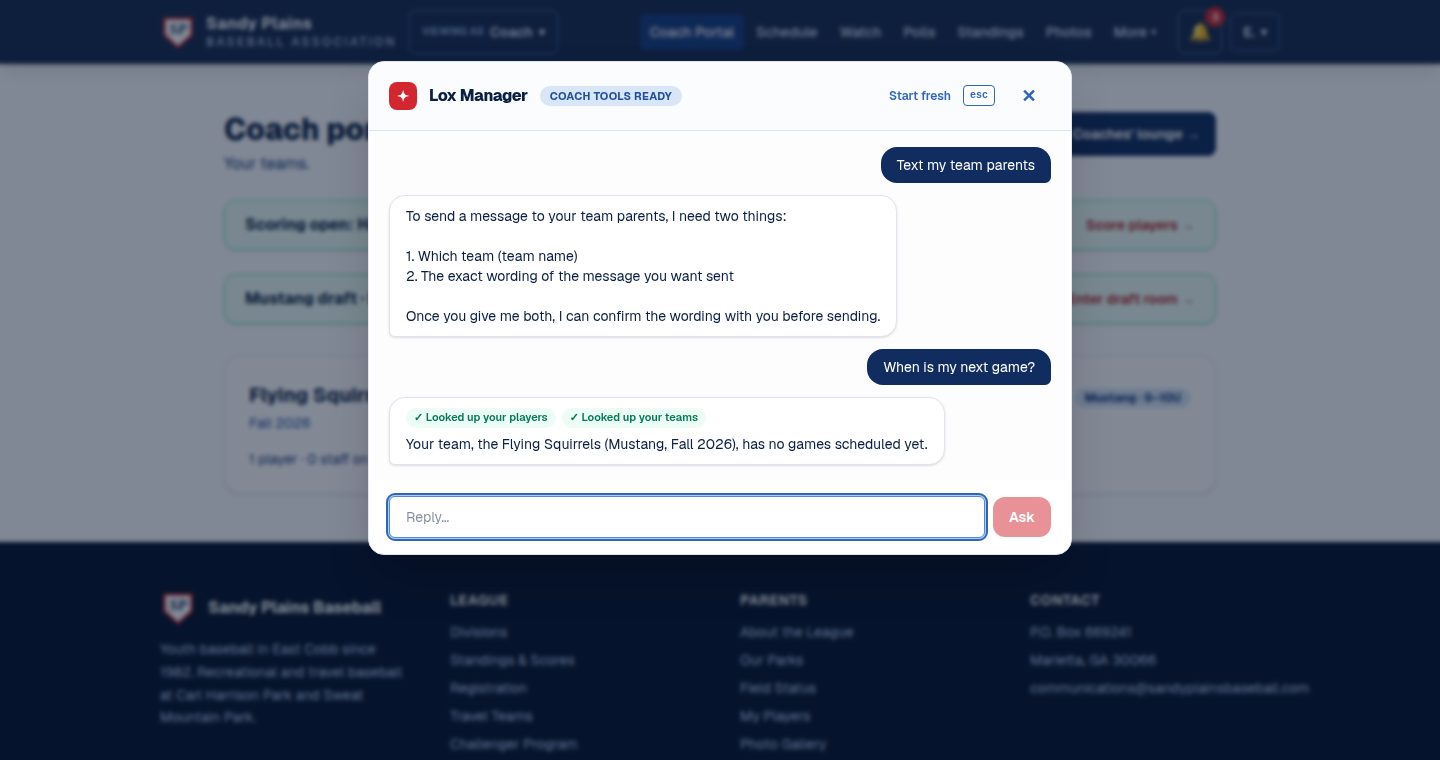
Lox Manager — the AI front desk
Not a chatbot that points at a help page. Lox Manager has the same hands as the UI: whatever a parent, coach, field manager, umpire, or admin can do on the site, they can do by asking — over SMS or on any page. A hundred and eight tools across every role, reaching every corner of the product — game plans, the drill shelf, film, the family's own records, even the bracket read backwards ("what happens if we lose?") — each one calling the very same guarded operation the button calls. It can never do what the person asking couldn't have clicked.
Families text it
“When's our next game?” · “Is Field 3 open?” · “I lost a glove at the park” — answered from the live schedule, field status, weather, and lost & found. No app, no login, no phone tree.
Staff command it
“Text my team's parents…” · “Move Tuesday's practice to Cage 2” · “Who hasn't paid?” — it drafts, you approve, it happens. Every outbound blast is shown for review before it goes anywhere.
It knows its place
Role-aware and permission-scoped: a parent can't see another team's medical notes, and neither can their assistant. Every action lands in the same audit log as a click.
The features boards ask about
Open a topic — each one has the details and real screenshots from the running platform.
🏟️ Draft night & tryouts
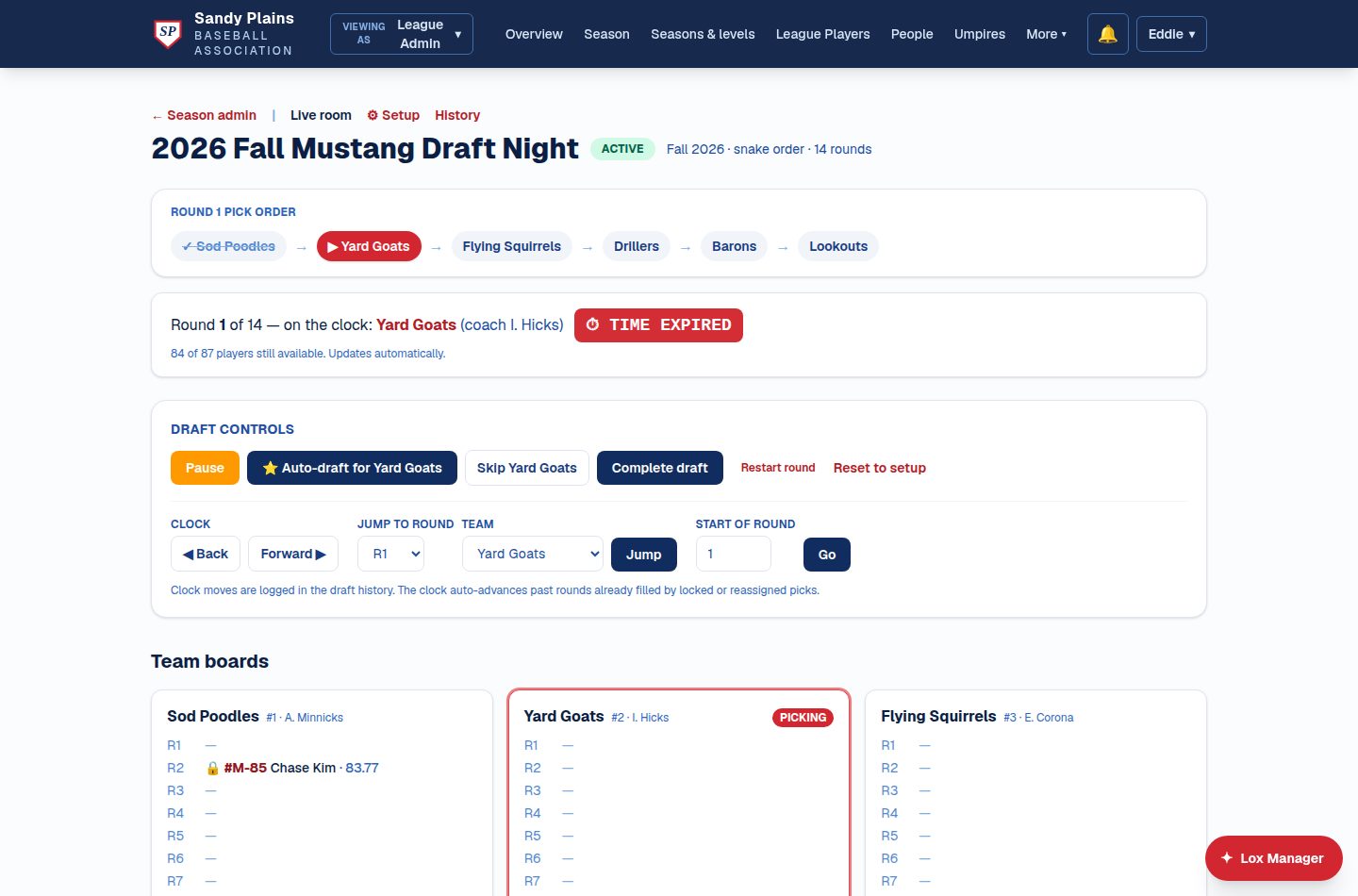
The live draft room
Tryout evaluations — several evaluators scoring concurrently, weighted composites — flow straight into the draft pool. Run the night on a shared live board: snake or round-slot, pick clock, auto-draft for the coach stuck at work, single-step undo, hat-pick for ties.
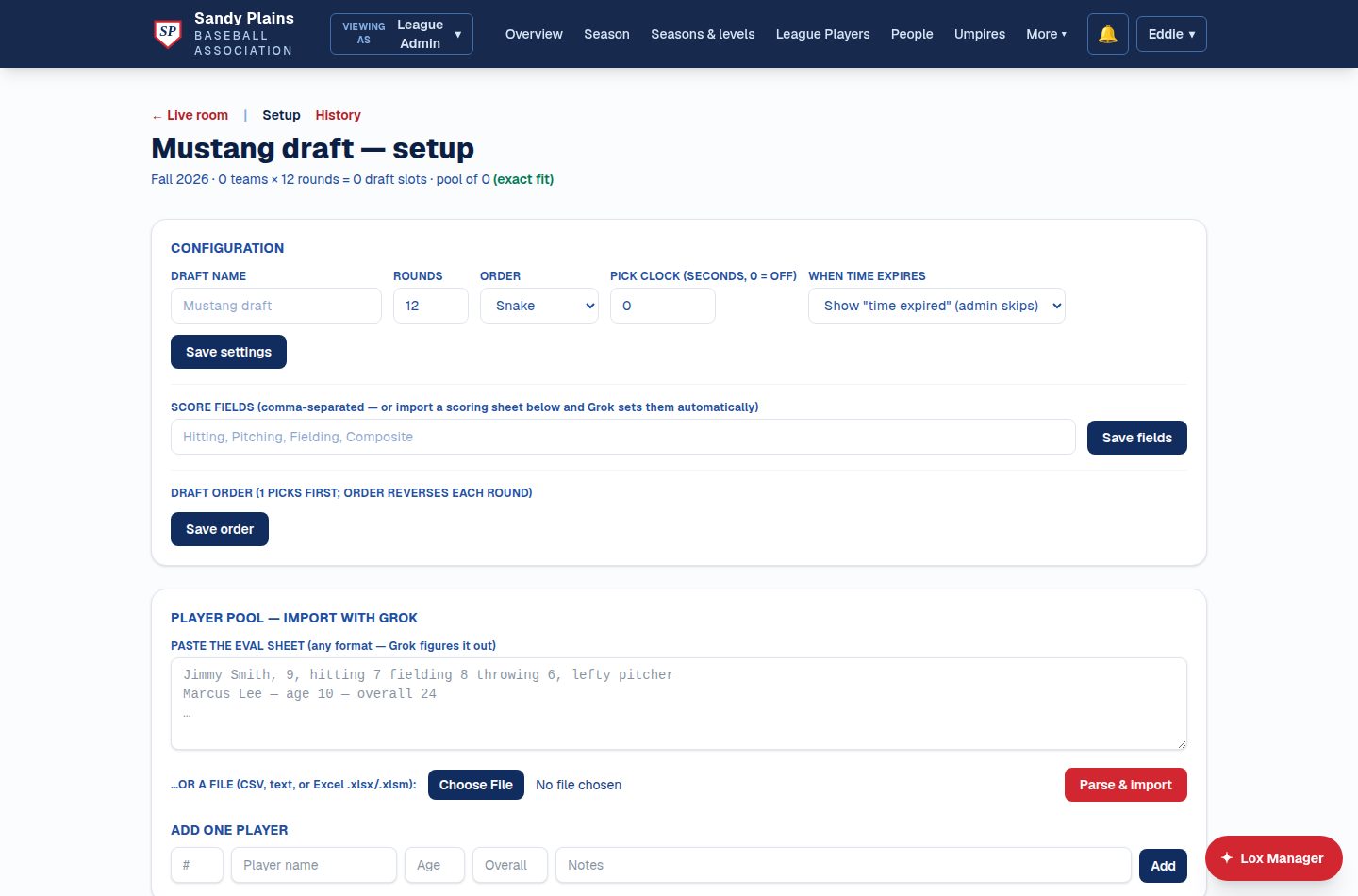
Setup in minutes, not evenings
Paste your evaluation sheet in whatever shape it's already in — a CSV, an Excel file, or messy freehand notes — and AI structures the player pool. Rounds, snake or round-slot order, and the pick clock are three fields.
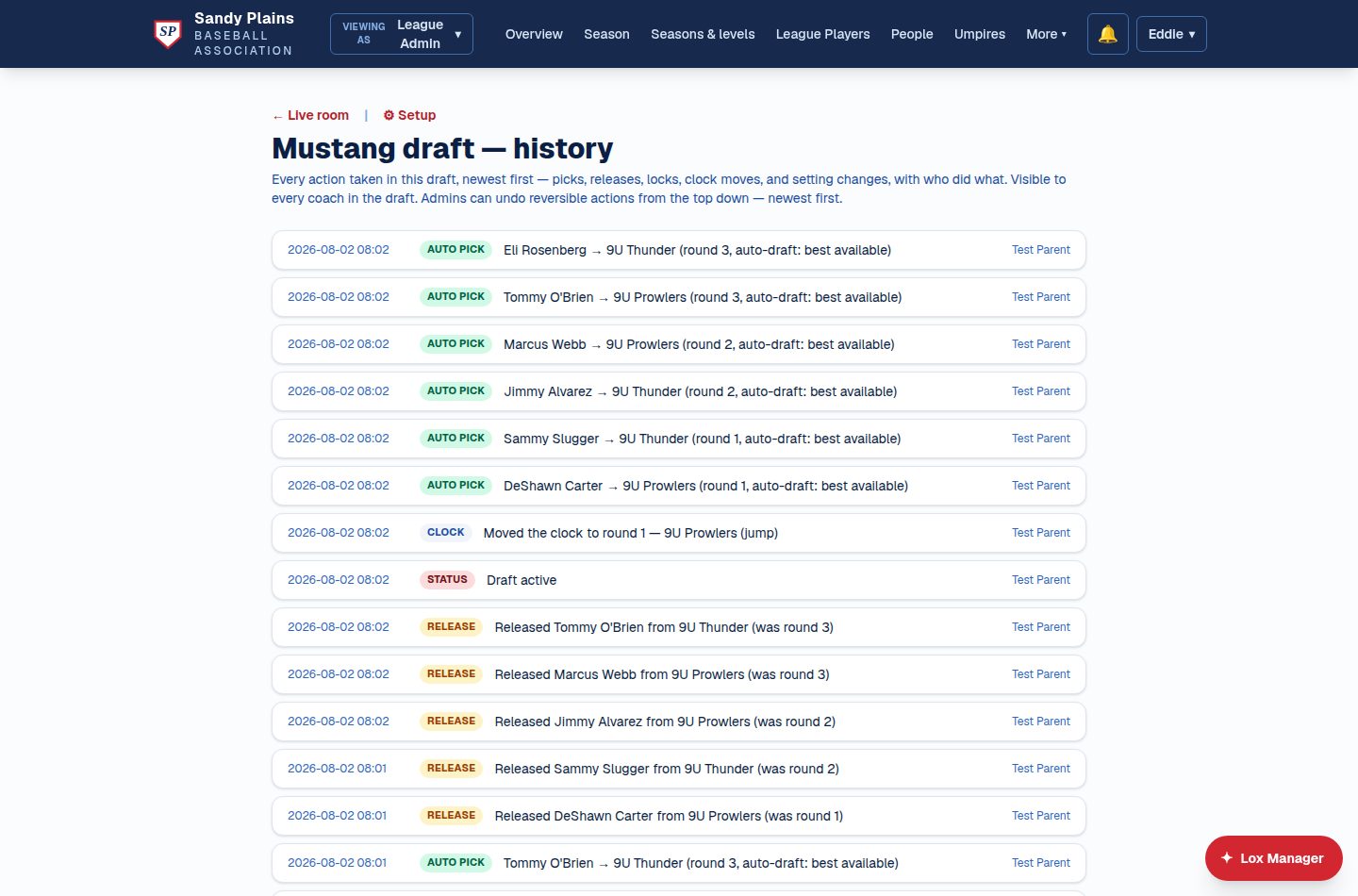
Every action on the record
Picks, releases, locks, clock moves, and setting changes are logged with who did what — visible to every coach in the draft, and reversible by the admin from the top down. No arguments about what happened at pick 40.
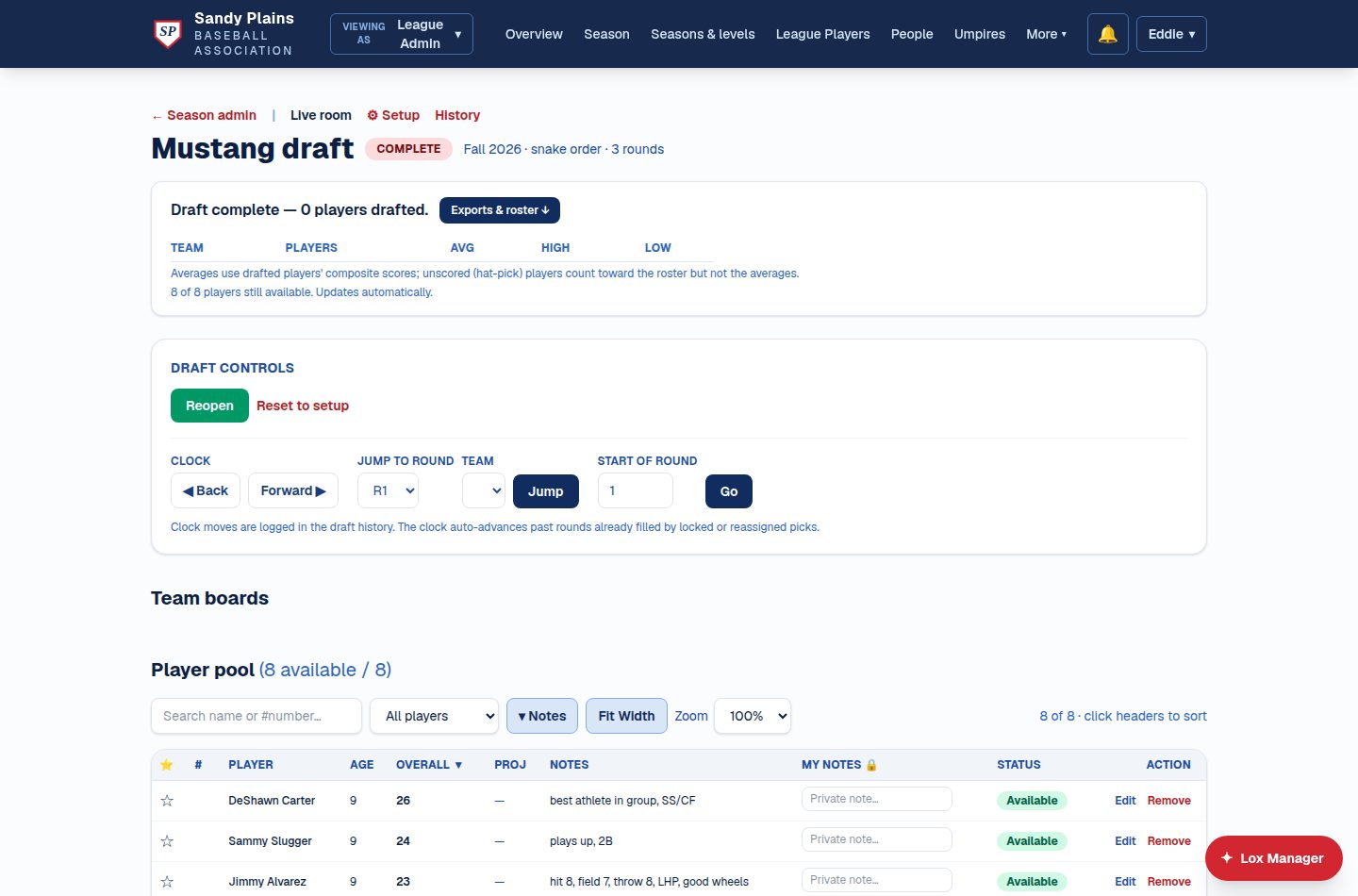
Done means done
When the last pick lands, rosters and exports are one click — team averages from the composite scores, and a designed PDF summary every coach walks out with. Reopen it if the board changes its mind.
Tryouts families book themselves
Give an evaluation a day and either individual appointment slots — five, ten or fifteen minutes — or named groups across the morning. Parents pick a time from their phone, a full slot shows as full, and rebuilding a session refuses while families are still holding times, so nobody turns up to an appointment that quietly stopped existing.
Scored by several people at once
Evaluators score 1–10 on the skill fields your league chose, weighted how your league weights them, at the same time and without collisions. Tryout numbers assign themselves. Composites compute, and one click pushes the whole pool into the draft — with guardian contacts deliberately left behind.
📅 Scheduling, fields & weather
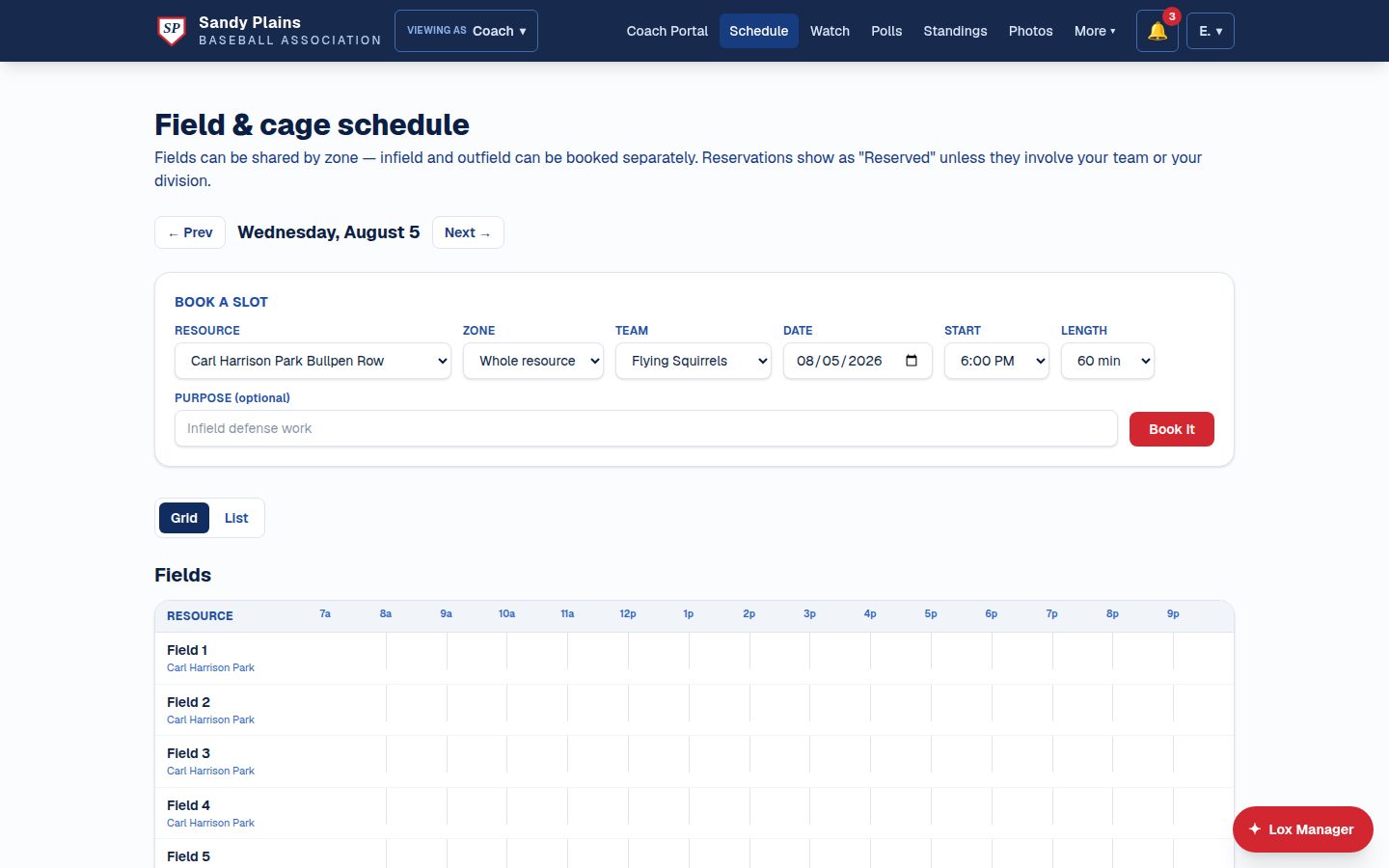
One calendar that refuses to double-book
Games, practices, reservations, scrimmage offers and league events all hold their slot in the same place, so a conflict is refused for everybody rather than for whoever checked. Zone-aware: the infield and outfield book separately, so batting practice and an outfield clinic coexist. An admin can still override anything — by typing OVERRIDE, after being shown exactly what will be cancelled and who gets texted — and every one of those changes can be undone, with the undo refusing rather than double-booking if the slot was retaken.
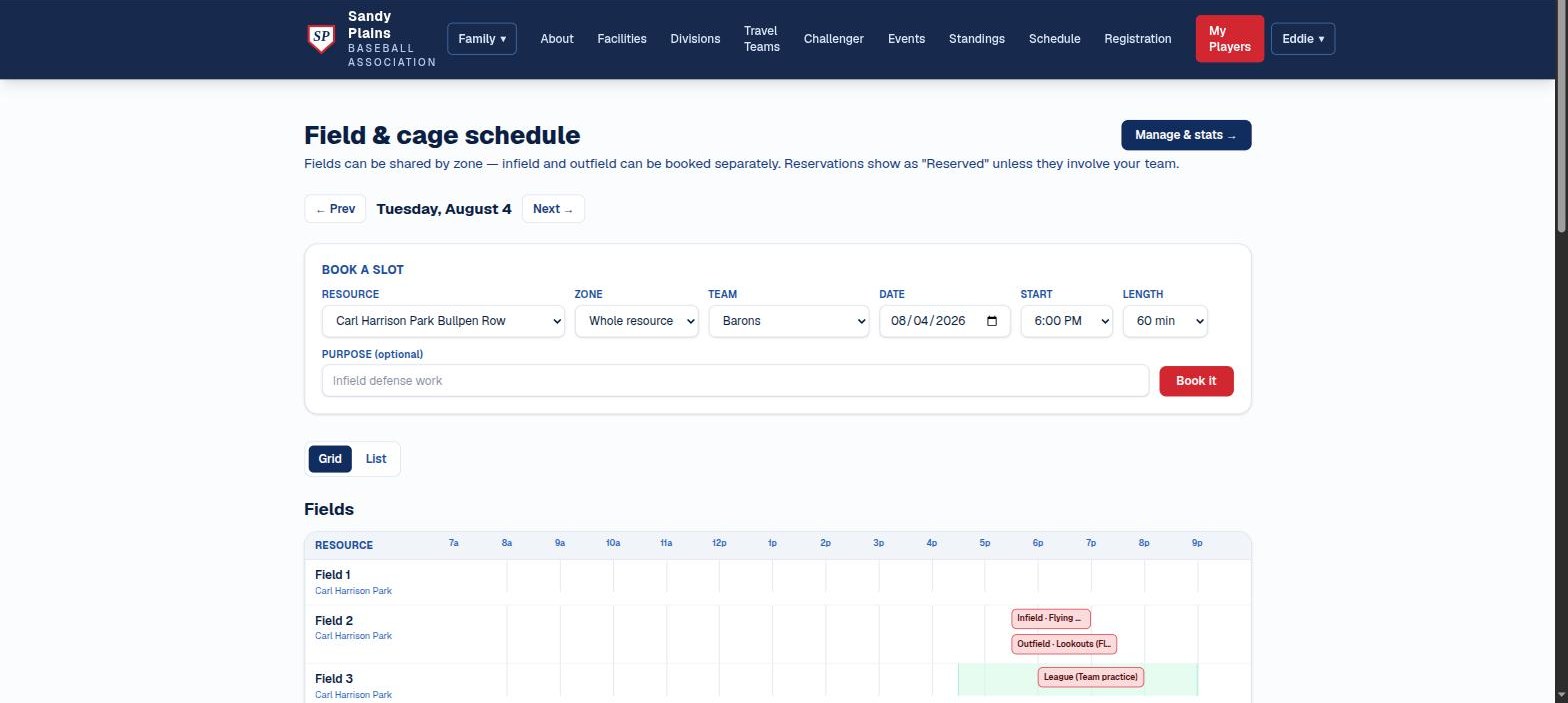
One schedule, grouped by park
Games, practices, reservations and league events all appear on one day view, grouped by park — one hour axis, one weather strip — so coaches see who has what and where the open slots are before they book. A free slot is one tap from the booking form. Grid or list, from a phone at the park.
Divisions can be designated to a home park: fields across town drop out of that division's pickers, the home park sorts first — and a booking that ignores the designation is refused at the server, not just hidden in the menu.
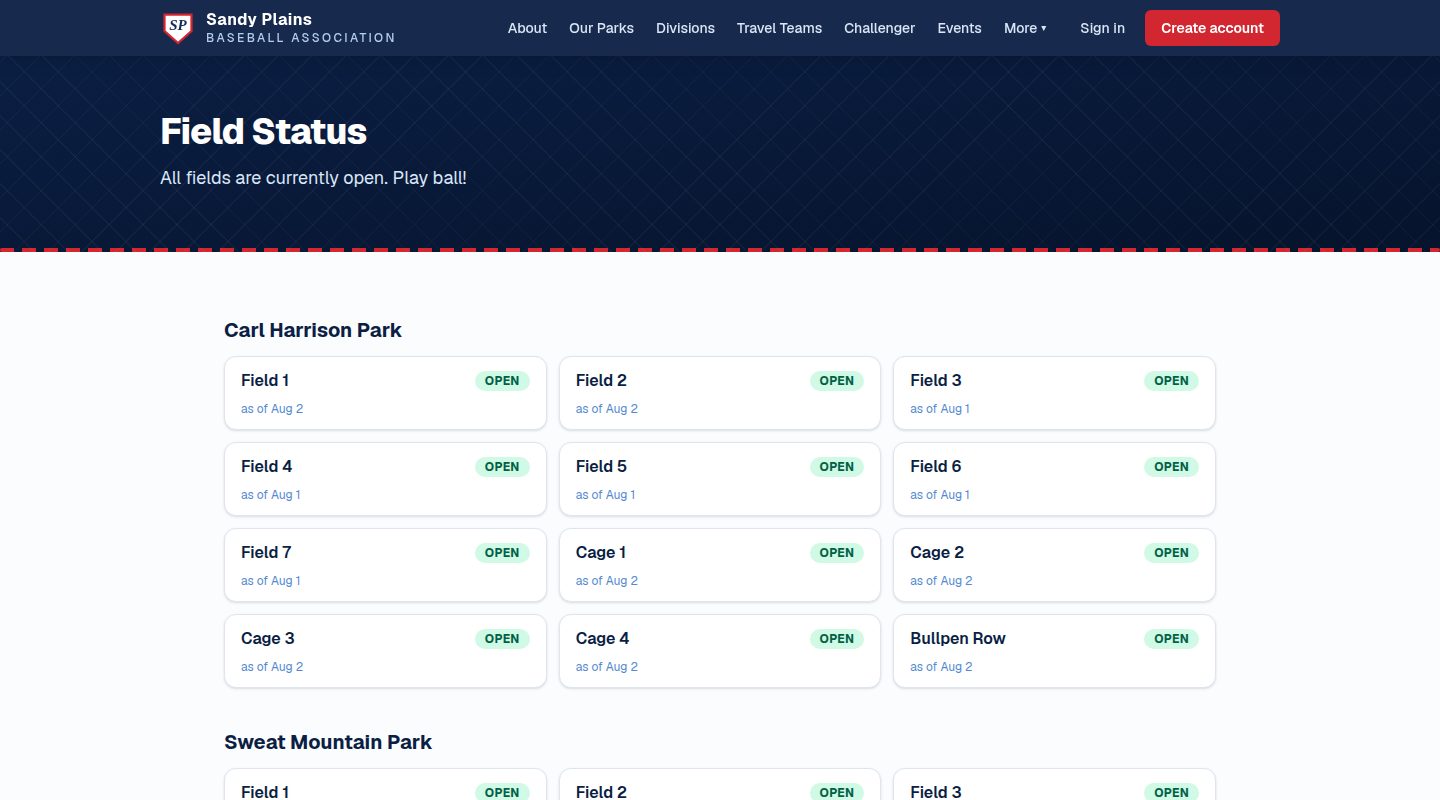
Field status the whole town can see
Field managers set open, closed, or caution from a phone at the park — one field or a whole park in a single press — and the public status page updates as they save. The notice goes only to the people it lands on: everyone with a game or booking there that day, not the whole league. When it reopens, only those who still have an unstarted slot hear back. A league that texts all 400 families about one closed cage is teaching them to ignore the next one.
Weather where the decision is made
The forecast sits on the game, the practice, and the field-booking screen — the hour itself inside two days, an outlook to a week, and a heads-up when rain, heat, or wind is worth a decision. It deliberately stops at a week, because a ten-day forecast is decoration.
League events that hold the field
Opening day, picture day, a coaches' clinic, the banquet — each with a date, a time, the resource it occupies, and an audience. An event on a field genuinely holds it, so nobody books over picture day. And because it carries an audience, a clinic for head coaches doesn't clutter four hundred parents' calendars. The volunteer jobs a board most wants filled — the concession rota, the gate crew — can belong to the league rather than to any one team.
Windows that know what season it is
Booking windows run per resource, per weekday, per division — "Mustang only, Tuesday and Thursday, 5:30 to 8:30" — and they're enforced, not advisory. Each one carries a date range or a season, so a window written in March stops governing in July instead of quietly outliving its season. A window can cover part of a resource, too: the infield reserved for 8U while the outfield stays open to anyone. Upload an aerial shot, the county park map, or a photo from the bleachers and outline each zone on it, so nobody has to guess which corner of the park "Field 2 — Infield" means.
🎥 Game day: broadcast, scoring & standings
Broadcast the game
The game page shows the live video beside a running scoreboard — balls, strikes, outs, runs — and families who can't make it watch from anywhere. Replays stay up afterward.
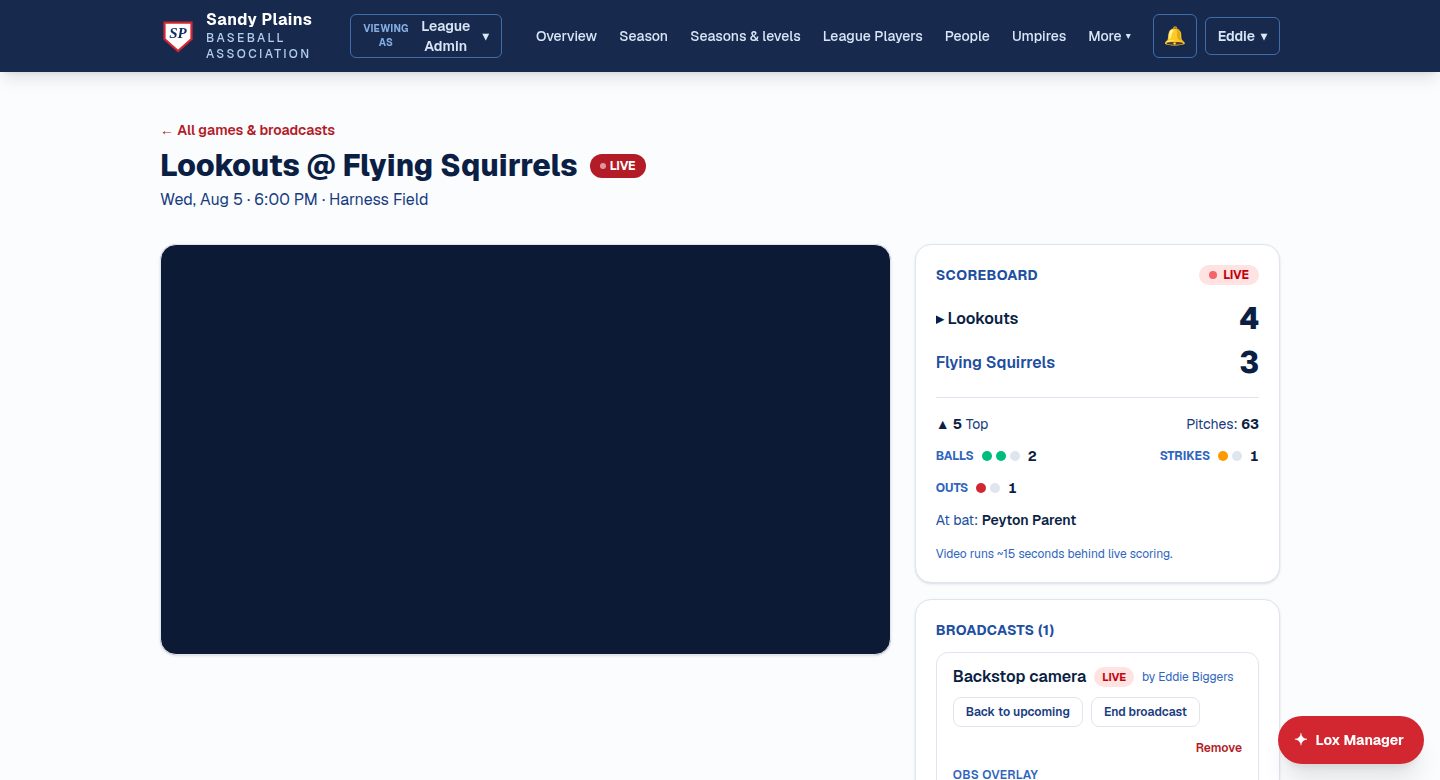

Scored from the bleachers
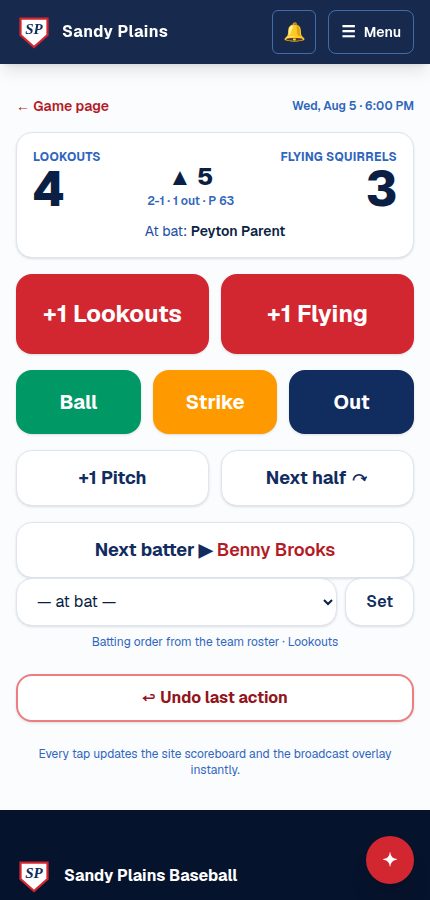
Live scorekeeping from a phone: balls, strikes, outs, runs, pitch count, and the batting order pulled from the game plan, with a single-step undo. Every tap updates the site scoreboard and the broadcast overlay instantly.
Standings that keep themselves
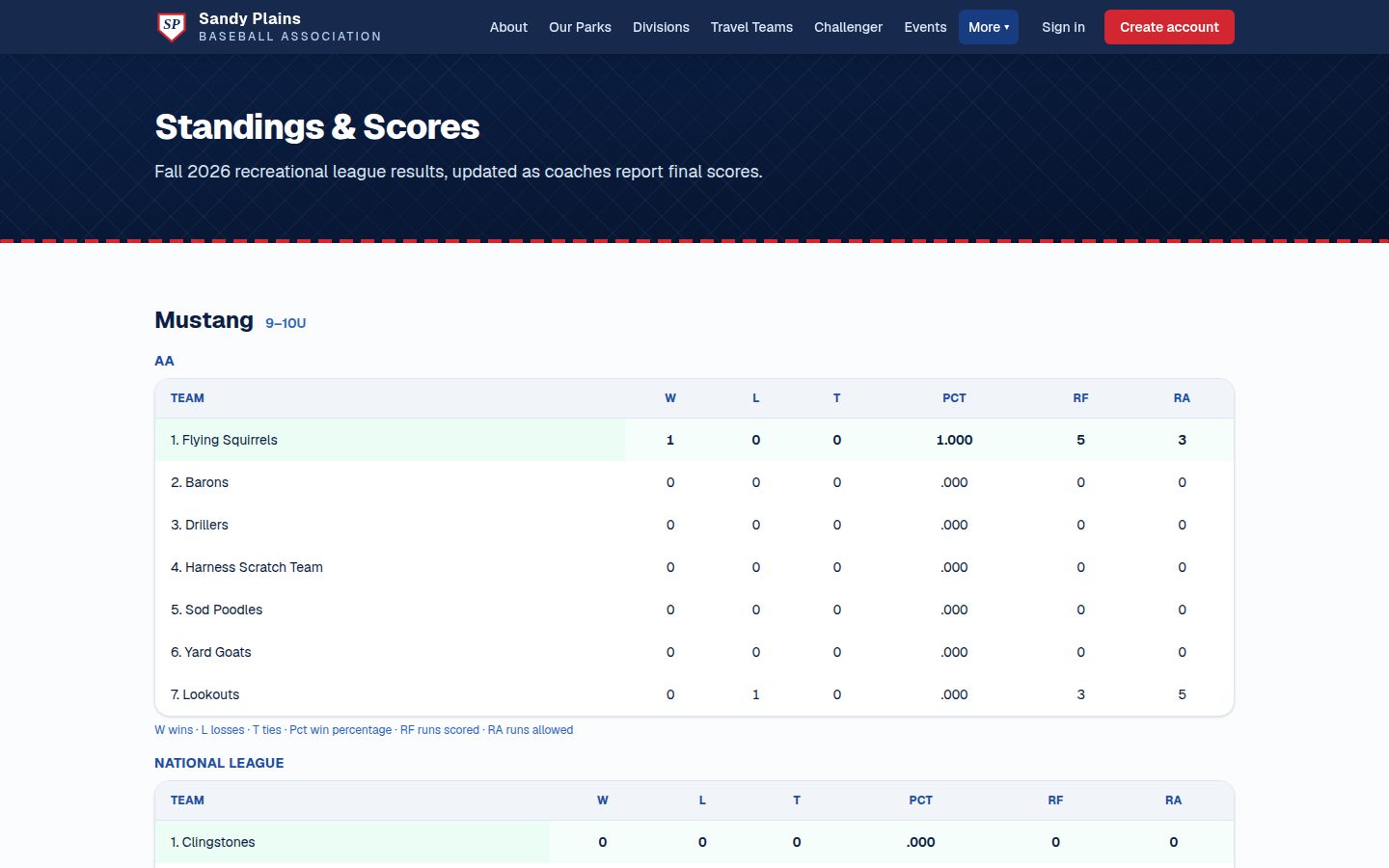
Coaches report finals; per-division standings, win percentage, and run differential update the moment the score posts. Ties count half a win, and the public page needs no login.
Built for how a league actually runs
Rec, all-star, and select seasons. All-star rosters built by selection, not registration. Umpire crews sized per division, game signup, and a payout ledger. Fair-play rules enforced in the lineup, not argued in the stands.
🏆 Tournaments & the post-season
A bracket that looks like a bracket
Single or double elimination, with as many levels as your post-season has — Gold, Silver, Bronze — and you decide where a beaten team drops to rather than straight out of the tournament. Matches sit level with the gap between the two that feed them, connected by lines you can trace with a finger, and the opening round stays put when you scroll a big draw sideways on a phone. It has its own print stylesheet, because a bracket's natural home is taped to a fence.
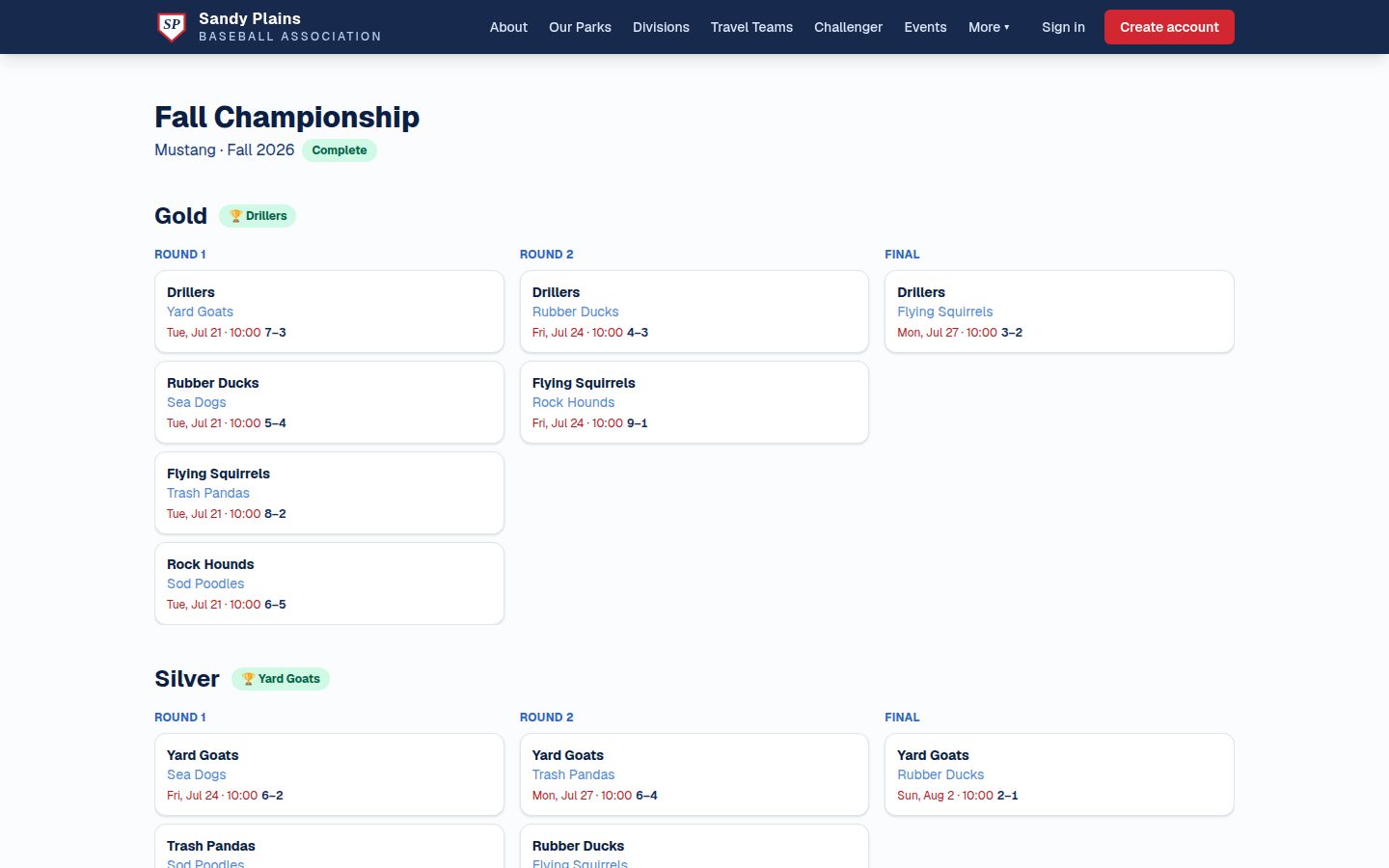
Seeding, byes, and the last few games
Seed from the division standings or set the order by hand. Byes are a decision, not an accident: give them to the top seeds, name who sits out yourself, or give them to nobody and play a preliminary round — and a bye shows as a bye rather than an unexplained blank. The final and the semis can be a best-of-three or five, where a tied game simply doesn't move the series, and the two beaten semi-finalists can play for third.
Real games, and a table that stays honest
A bracket game is a real game: it lands on the schedule, takes a scorekeeper, draws an umpire crew, and carries a forecast — but it never moves the league table. Post a score and the winner advances on its own. Correct a score afterwards and the bracket corrects with it. A tie waits for the tiebreak rather than inventing a winner.
The public bracket
One page, no login, refreshing while games are on — so the grandparent who couldn't make Saturday can still follow it, and so can the family deciding whether to drive over for the next one.
✋ Attendance, volunteers & the one calendar
Who's actually coming on Saturday
Families answer per child, per game and practice — two kids on the same team are two separate answers, because they usually are. The coach gets a headcount and, more usefully, the list of families who haven't answered yet, which is the half that decides whether you're running a scrimmage or a fielding drill. The coach's own answer never quietly lands in the player count.
Somebody has to keep the book
The league keeps a list of its standard jobs — scorekeeper, pitch counter, field prep, concessions — and a coach attaches one to a game or practice in a single press. Only that team is asked, and on a game only your side of it, never the opposition. If a job is still short as the date nears, the team is asked again by text, and a parent can reply to that text to take it. Somebody drops out and the slot reopens immediately.
Jobs that belong to the league
The concession rota, the gate crew, clinic setup — the jobs a board most wants filled, and the ones that used to have nowhere to live because every volunteer slot had to hang off a team. Now they attach to a league event instead, and the league asks whoever it needs to ask.
One calendar, per person
A family with two children on different teams used to check four pages to work out a Saturday. One calendar now puts their games, practices, team events and league events in a single list, with the reason each row is there — "Maya", "you coach", "league event" — what still needs an answer, and what they've put their hand up for. It's filtered by who would actually turn up, not by role.
📖 Playing rules, with answers on the record
Published, versioned, and public
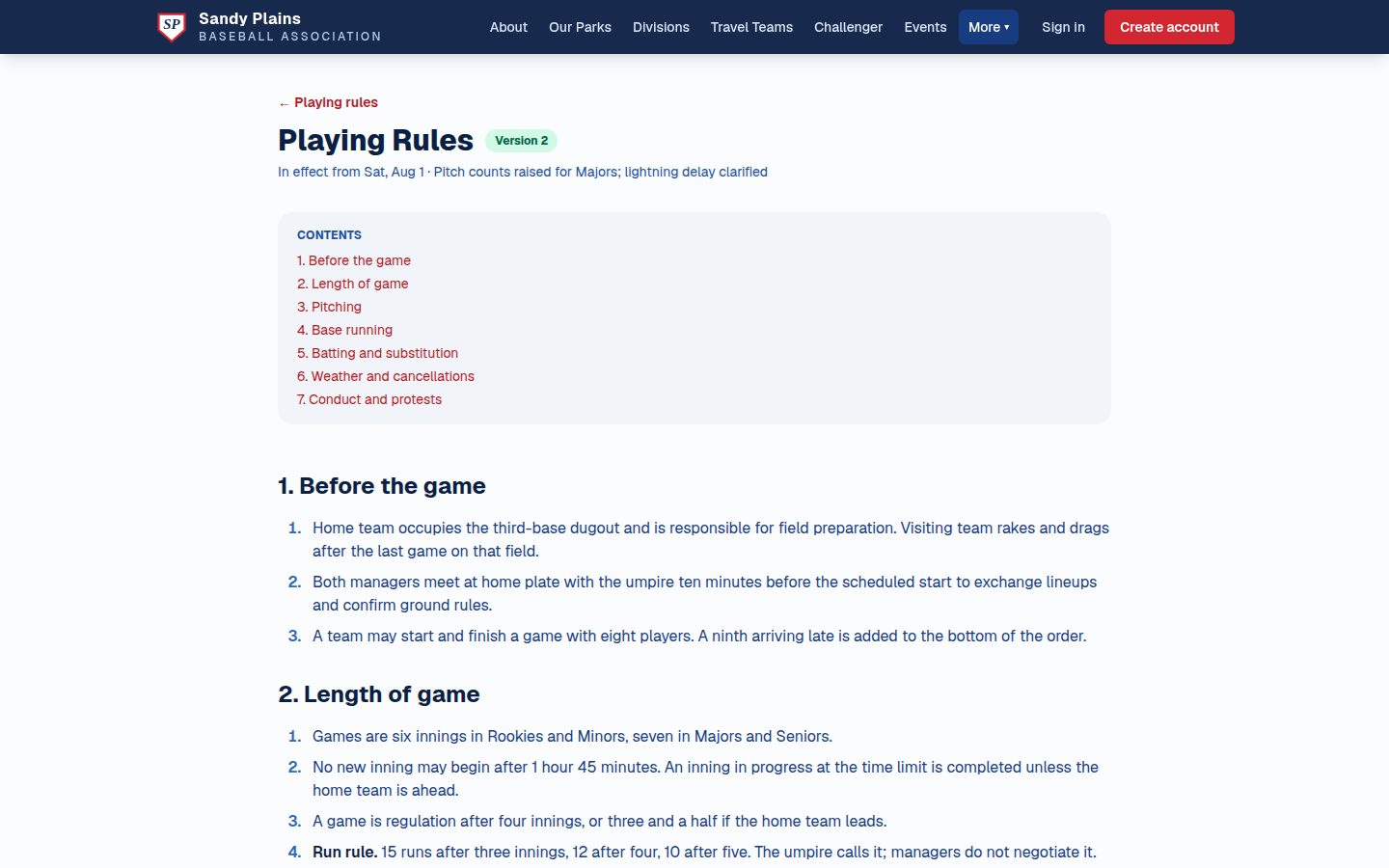
Keep as many documents as your league actually has — playing rules, a division supplement, tournament rules, a code of conduct. Each is edited as a draft and published with a change note; every past version is kept and can be read line by line against the current one. The current version is public with no login, so a visiting umpire can read your pitching rule in the car park. Publishing notifies every coach and umpire.
The question, and the league's answer
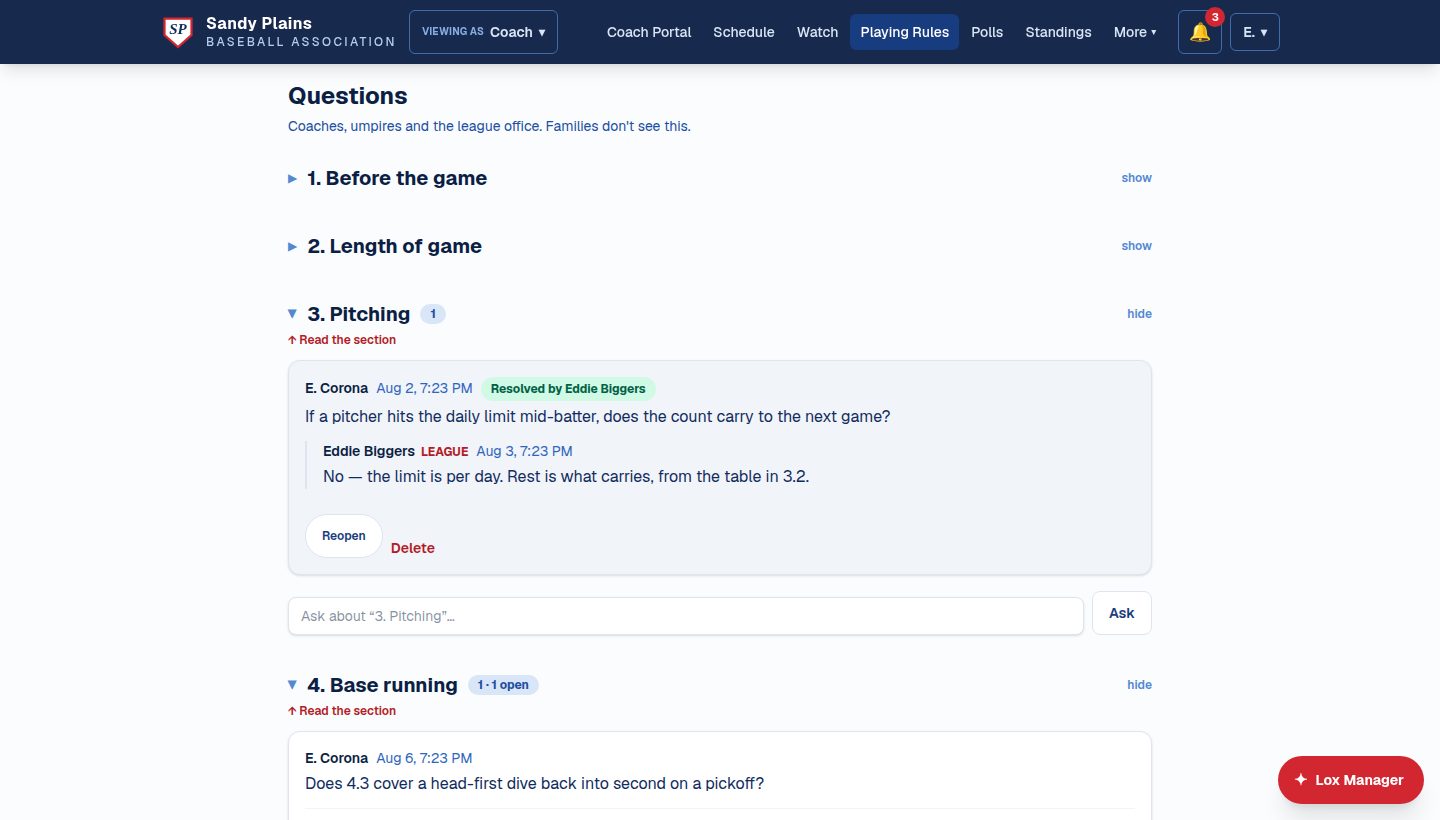
A coach raises a question against a specific section — not a general email nobody can find in August — and the league office answers it there. The thread is marked resolved and stays on the record, so the next coach with the same question reads the answer instead of asking it. Rename or remove that section later and the question survives rather than being orphaned.
And Lox Manager reads them too
Text the league "how many innings can a 10-year-old pitch?" and the answer comes from your rulebook, quoting the section and the version it came from — never from a draft you haven't adopted. When the rulebook doesn't cover it, it says so rather than inventing something plausible, which is the only behaviour a board can live with.
Tied to the divisions they govern
Link a document to the divisions it applies to and mark one for the homepage, so a Mustang parent sees the Mustang supplement without wading through the select-team rules.
📝 Registration & league admin
Registration that closes itself
Set a capacity and walk away: the division closes when it fills, overflow moves to the waitlist automatically, and a waitlisted family is never charged for a spot they don't have. Promotions come with a three-day payment window before the spot returns to the pool. The site tracks who's paid, waives fees in bulk, and chases the rest.
Seasons, levels & divisions
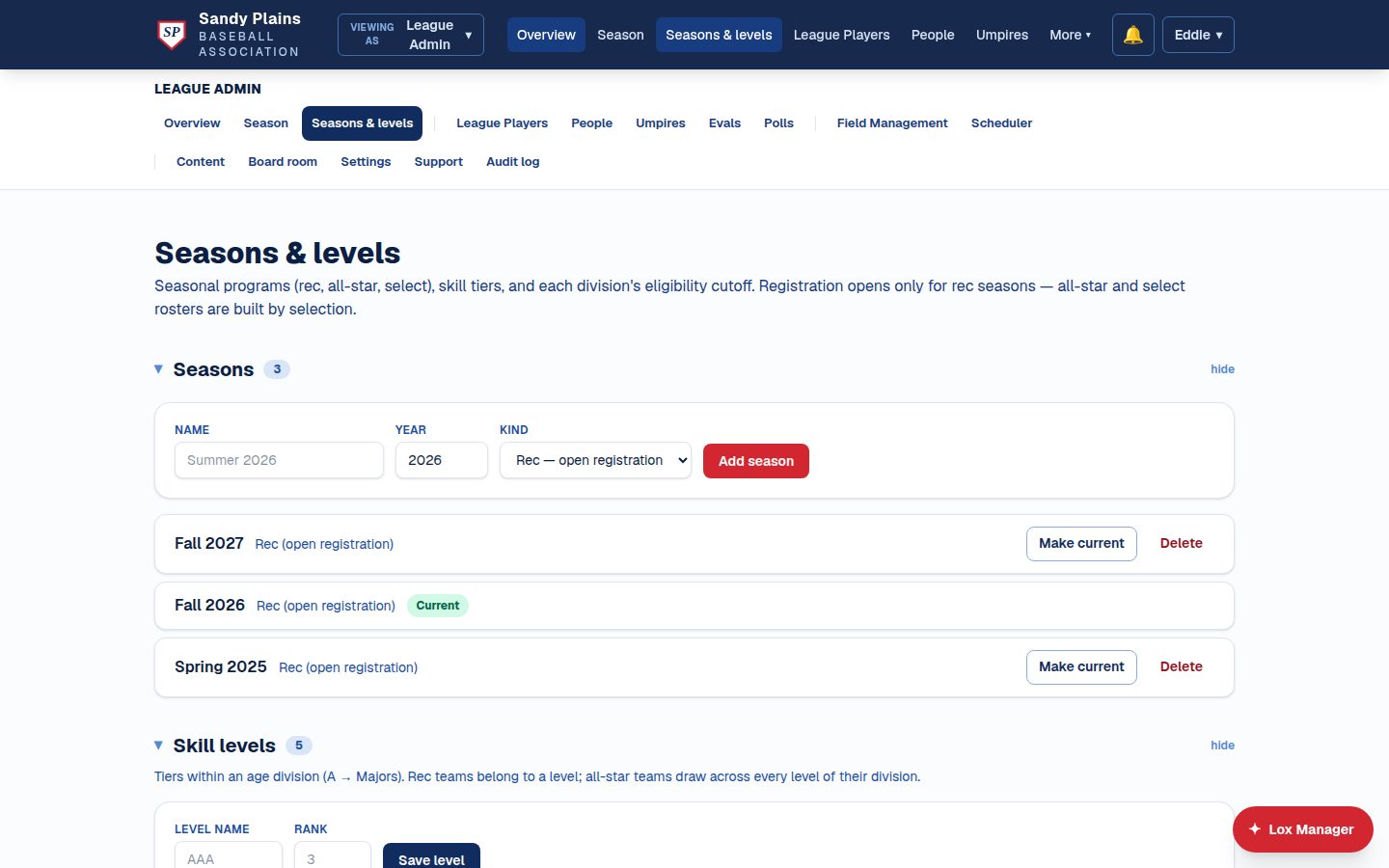
Rec seasons open for registration; all-star and select rosters are built by selection. Skill tiers live inside age divisions, each with its own eligibility cutoff — configured once, then the site enforces it everywhere. Build a season months ahead — name it, date it, set up its divisions and field windows, and leave it. Reaching the start date deliberately doesn't flip the league over: the board is reminded and the platform waits. It also says so when the current season has run past its own end date.
One login, every hat
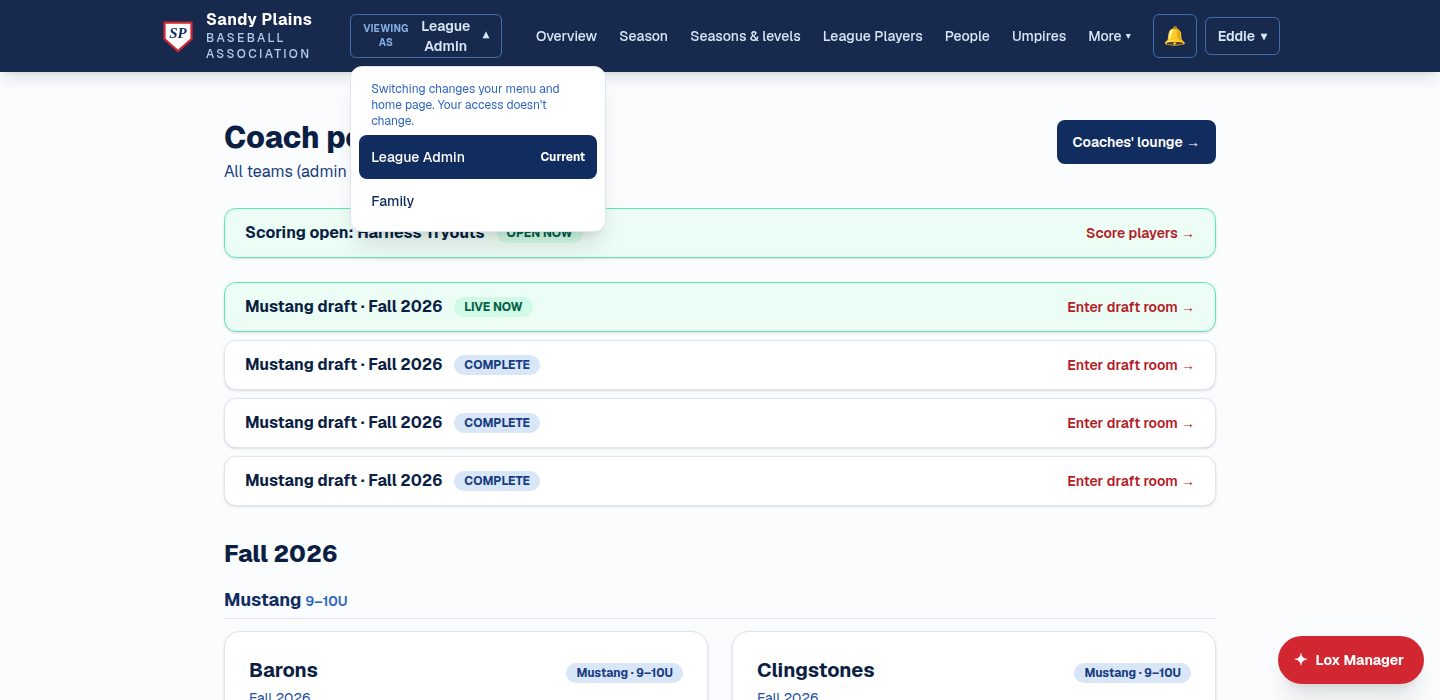
The board president is usually also a parent — and sometimes a coach. One account holds every role, with a switcher that changes the menu and home page without changing what you're allowed to do.
Support & operations
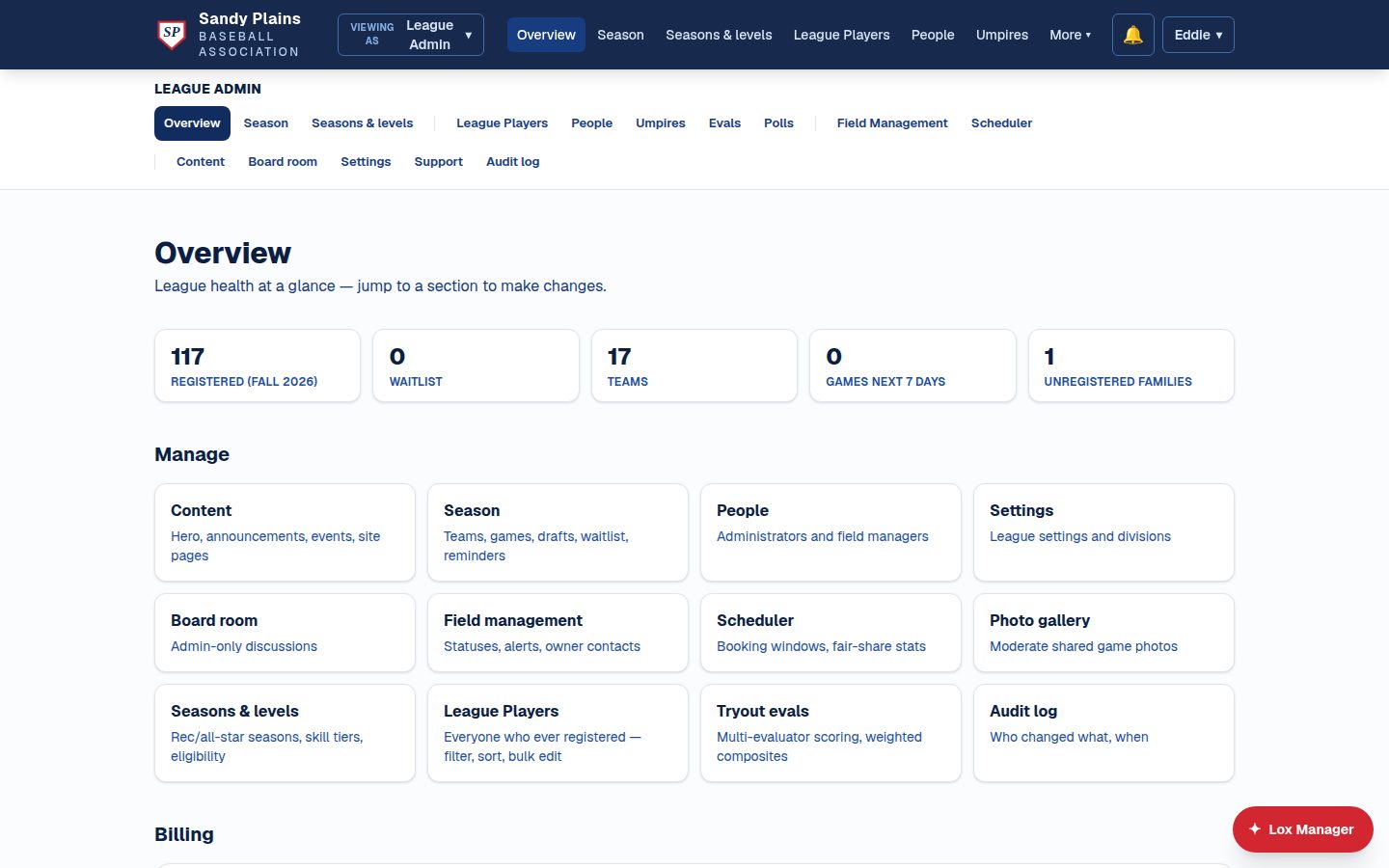
A built-in support desk with ticket resolution notices, a notification centre for every role, and an audit log across the platform. Your league runs on its own instance with its own database, and every release builds a fresh server beside the running one, switching over only once the new one answers healthy. Hosting, TLS, and support are included — and setup takes about a week from the day you send us your content.
The whole family, not just the player
Invite a second parent or guardian by email and they get the same access — either can leave, neither can remove the other, and they don't see each other's personal details. An emergency contact who isn't an account at all sits alongside them, visible to that child's coaches and the league office and nobody else. The participation waiver is signed online and stamped with the date, the signer, and the version of the wording — so rewriting your waiver marks every signature against the old text as out of date, by itself, without anyone auditing a spreadsheet.
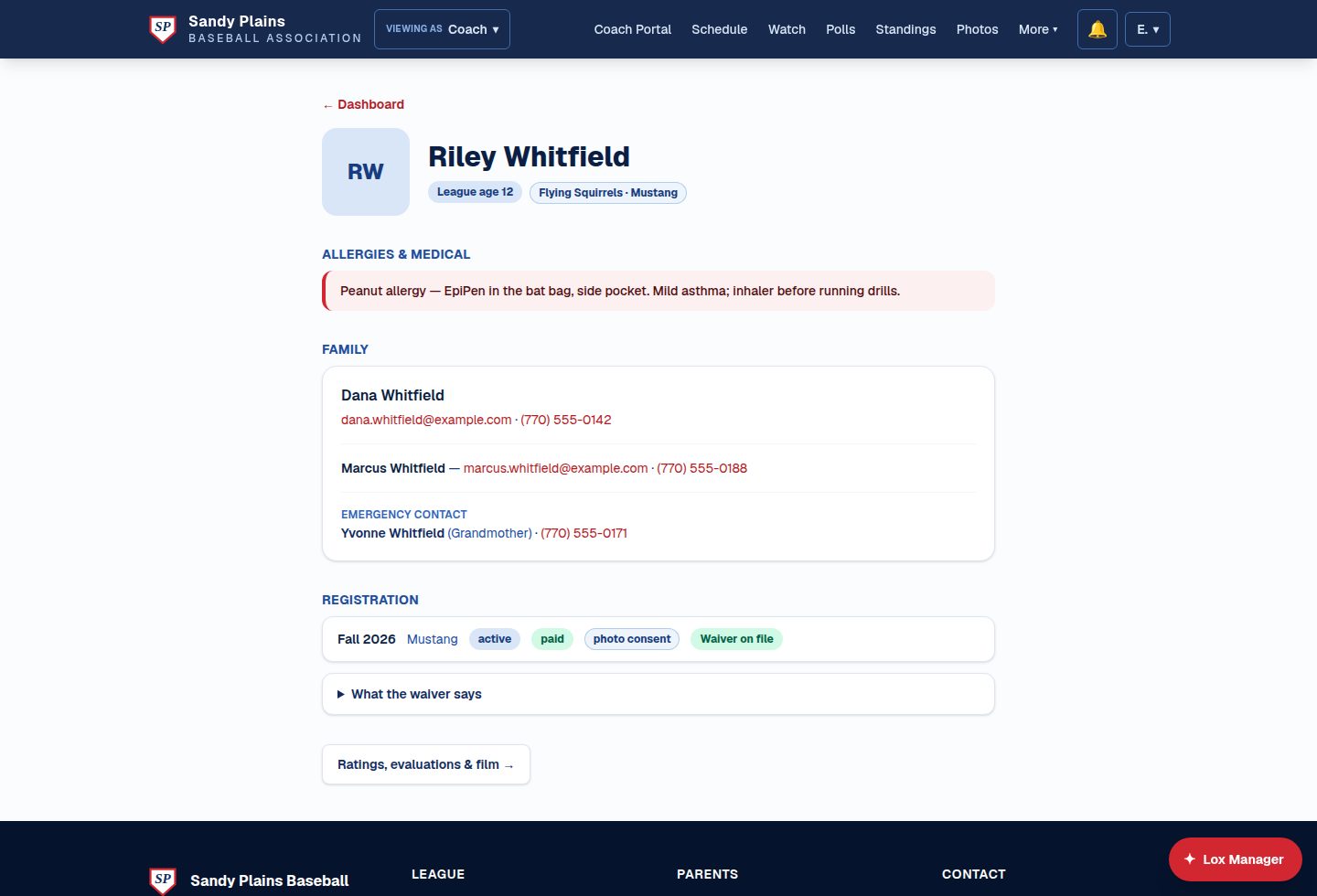
A page per player, and who gets to see it
Tap a child's name anywhere — dashboard, team page, coach roster, the league player list — and you get their record. What's on it depends entirely on who you are: their coach sees medical notes and both parents; another team's parent gets a name and a face and nothing else. The league office can correct a name, a birthdate, a height or a set of medical notes without ringing the family, and changing a sign-in email takes a typed confirmation, writes its own audit line, and notifies both addresses. It can also suspend an account for a stated reason until a stated date.
One spelling per column
Bats, throws and shirt size are picked from a list on every screen that touches them — the family's form, the office's form, the import review — so a league can't end up holding "R", "Right" and "righty" in the same column and then miss half its left-handed hitters when it filters. Height is entered as feet and inches, because no parent knows their nine-year-old is fifty-four inches. Anything already recorded in a spelling the list doesn't have is kept and shown as written, never silently blanked.
A coaching roster the board controls
Invite coaches by email and scope them to a season. A team can exist before it has a coach, and a coach can hand a team on mid-season — neither of which used to be possible. Assistant coaches are a real role rather than a compliance row: the head coach grants capabilities one at a time, with the schedule, plans and ratings on by default and film, messaging, scoring and scrimmages off until granted. Anything not granted is refused, not merely hidden.
🧢 Umpires & trainers optional programs
Umpires who staff themselves
Umpires apply, the league approves, and from then on they pick up their own games: every game that still needs a crew is on their board, sized per division. Sign up, withdraw if plans change, and confirm after the final out — each assignment shows exactly where it stands.
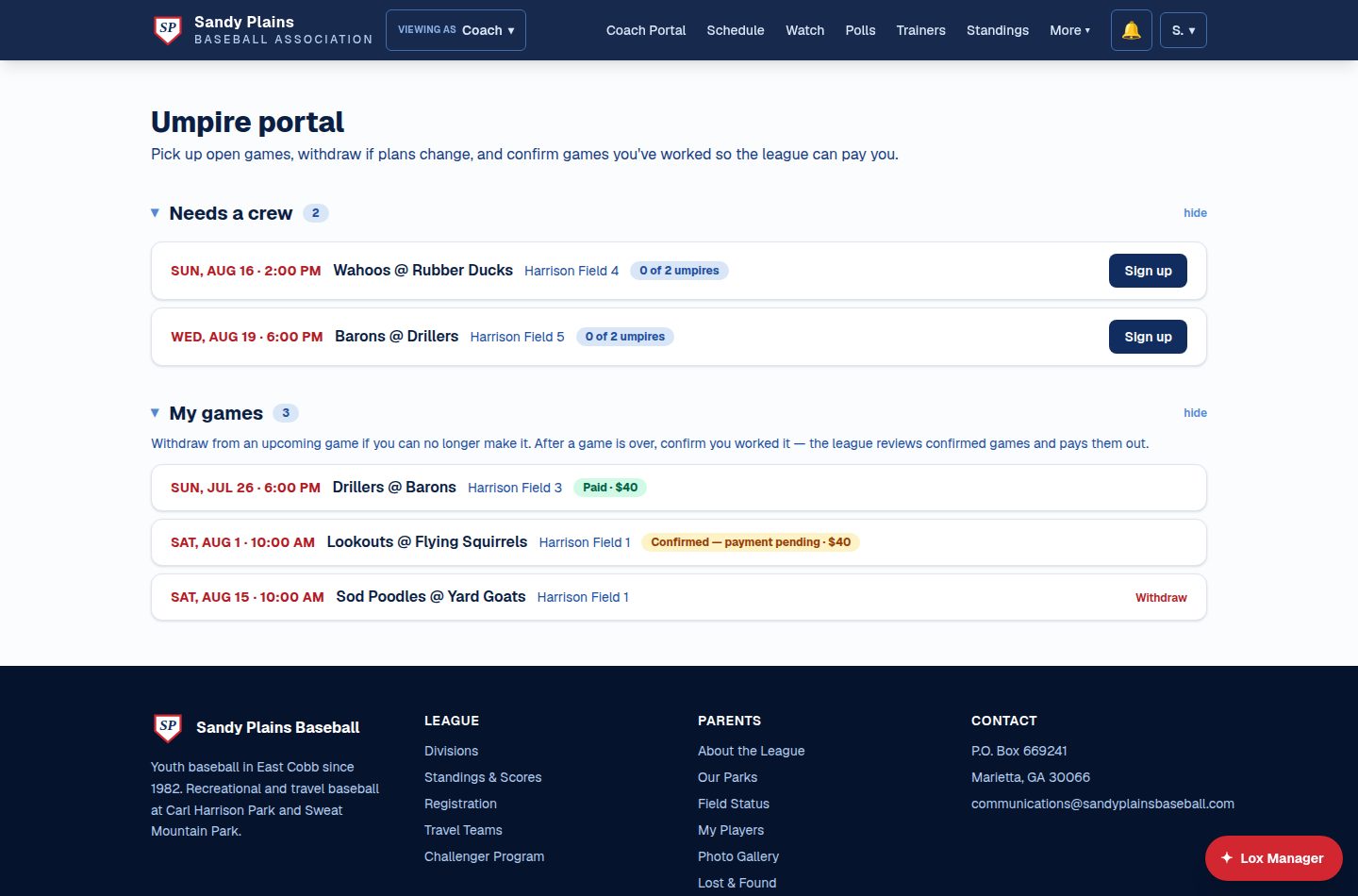
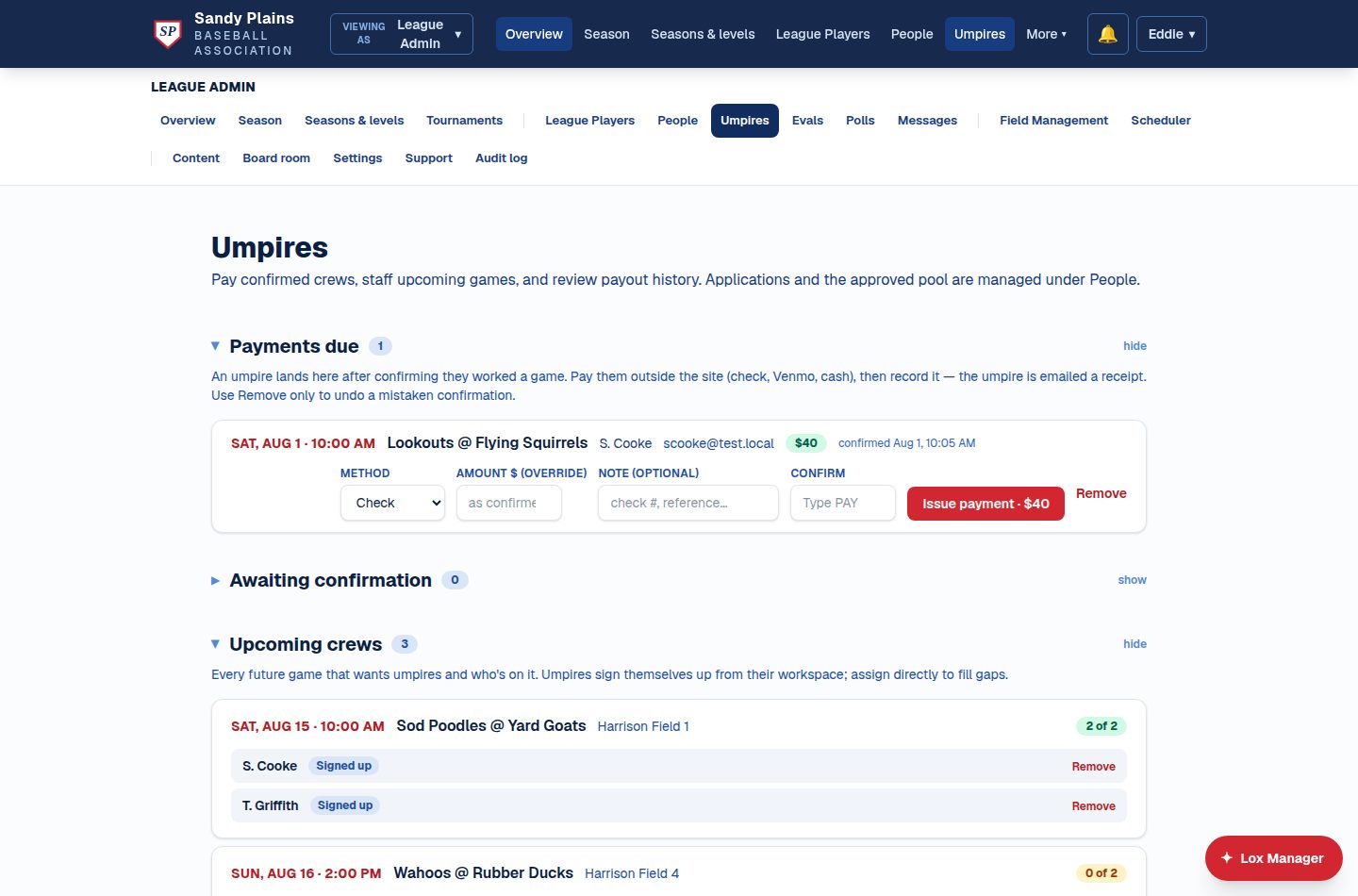
A payout ledger, not a guess
When an umpire confirms a game, it lands in the league's payments-due queue with the division's rate attached. Pay however you already pay — check, Venmo, cash — and record it with a typed confirmation; the umpire gets a receipt and the ledger keeps who, what, and when.
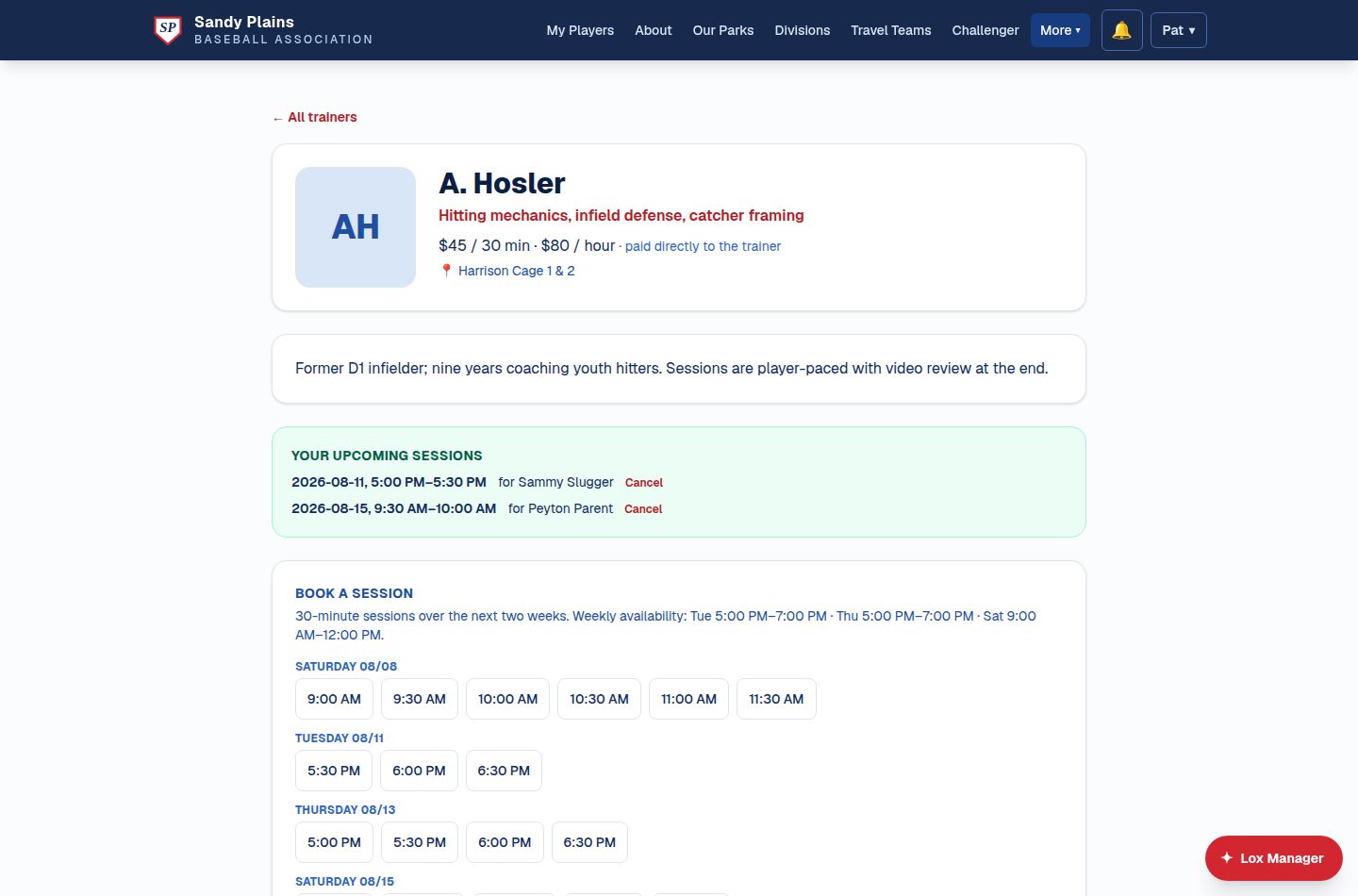
League-approved trainers, booked by families
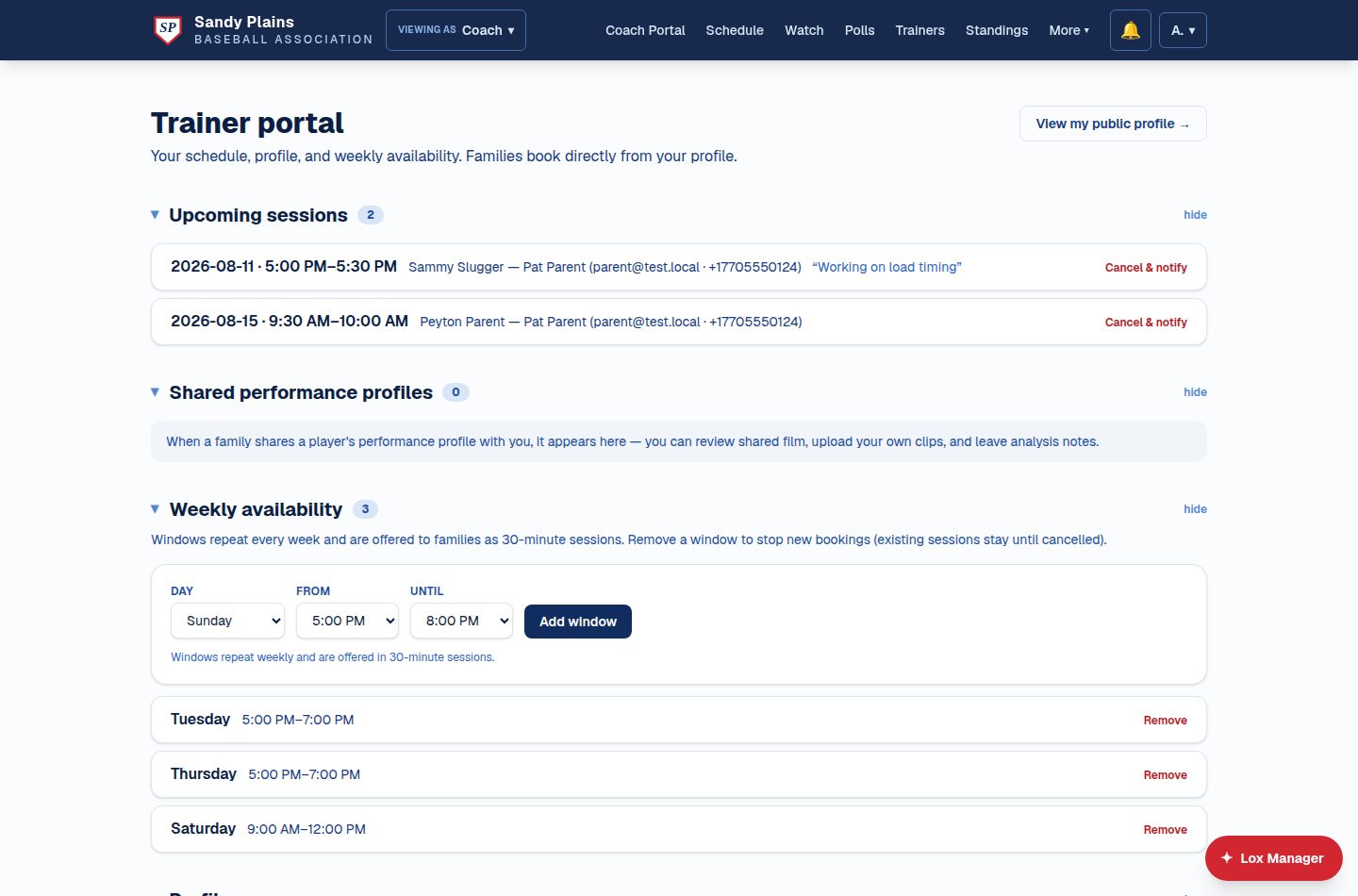
Trainers the league has vetted publish a profile — specialties, rates, locations — and their weekly availability becomes a booking calendar of open slots. Parents book a session for a specific player in two clicks; rates are paid directly to the trainer.
The trainer's side of it
Trainers manage their own weekly windows and see every upcoming session with the family's contact details. When a parent shares a player's performance profile, the trainer can review film, upload clips, and leave notes — visible only to who the family chose.
📚 The drill library shared between leagues
The coach with a great drill finally has somewhere to put it
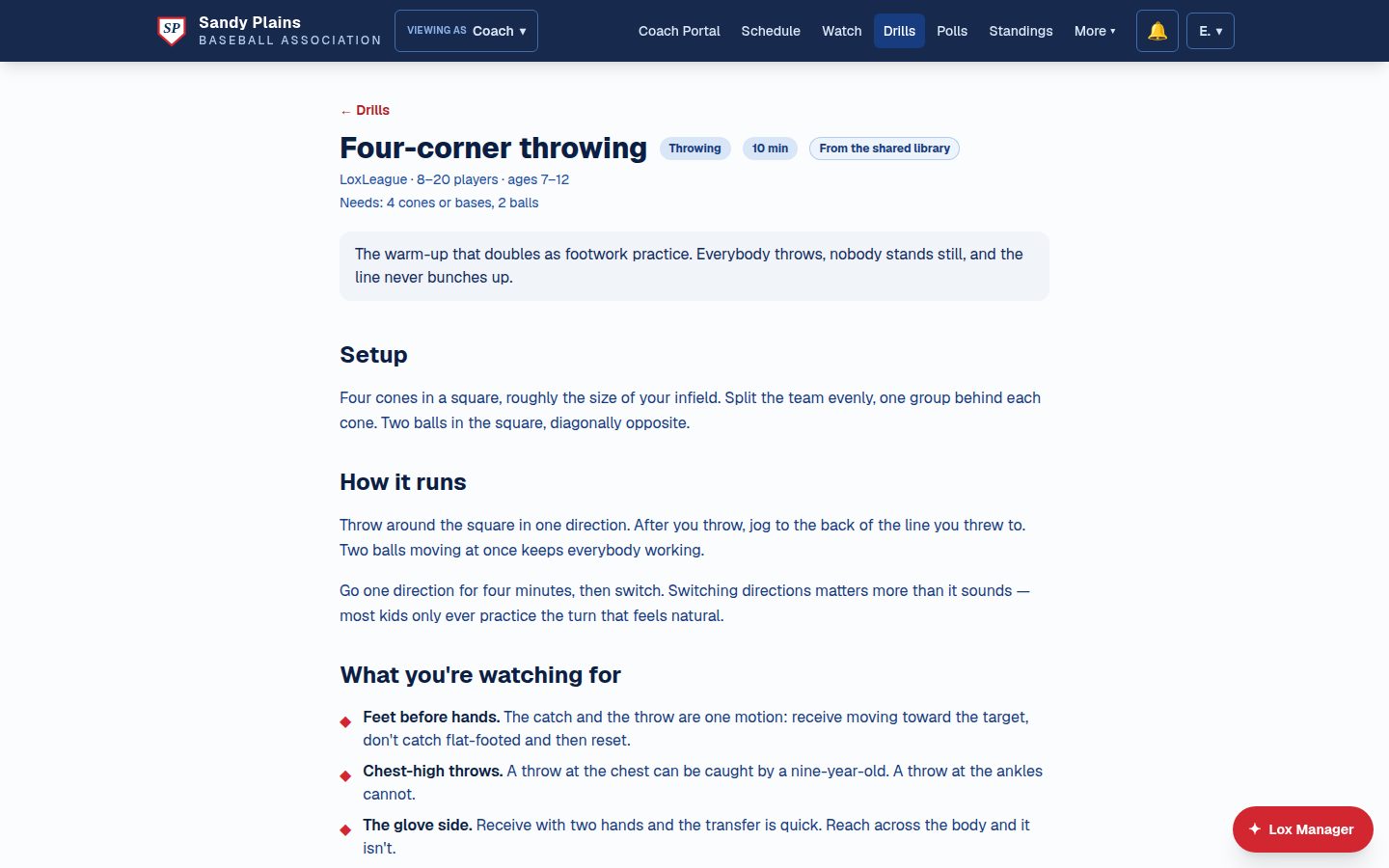
Every league has a coach who runs the best throwing warm-up anyone has seen — and loses it the year they stop coaching. Here it gets written down properly: setup, how it runs, what to watch for, photos and diagrams. Filter the shelf by skill, by how long you've got, and by how many players actually showed up.
Rated by the coaches who actually ran it
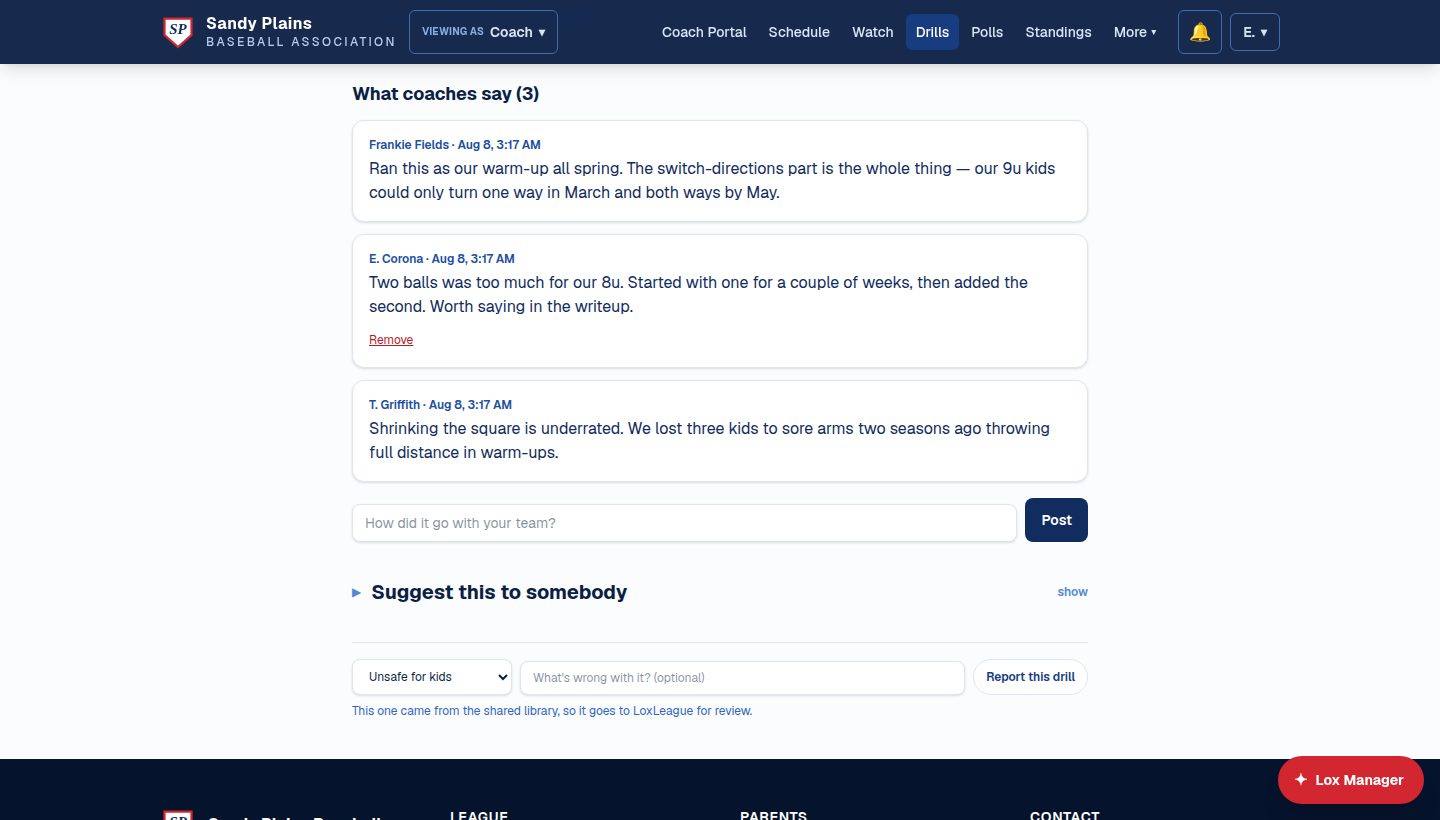
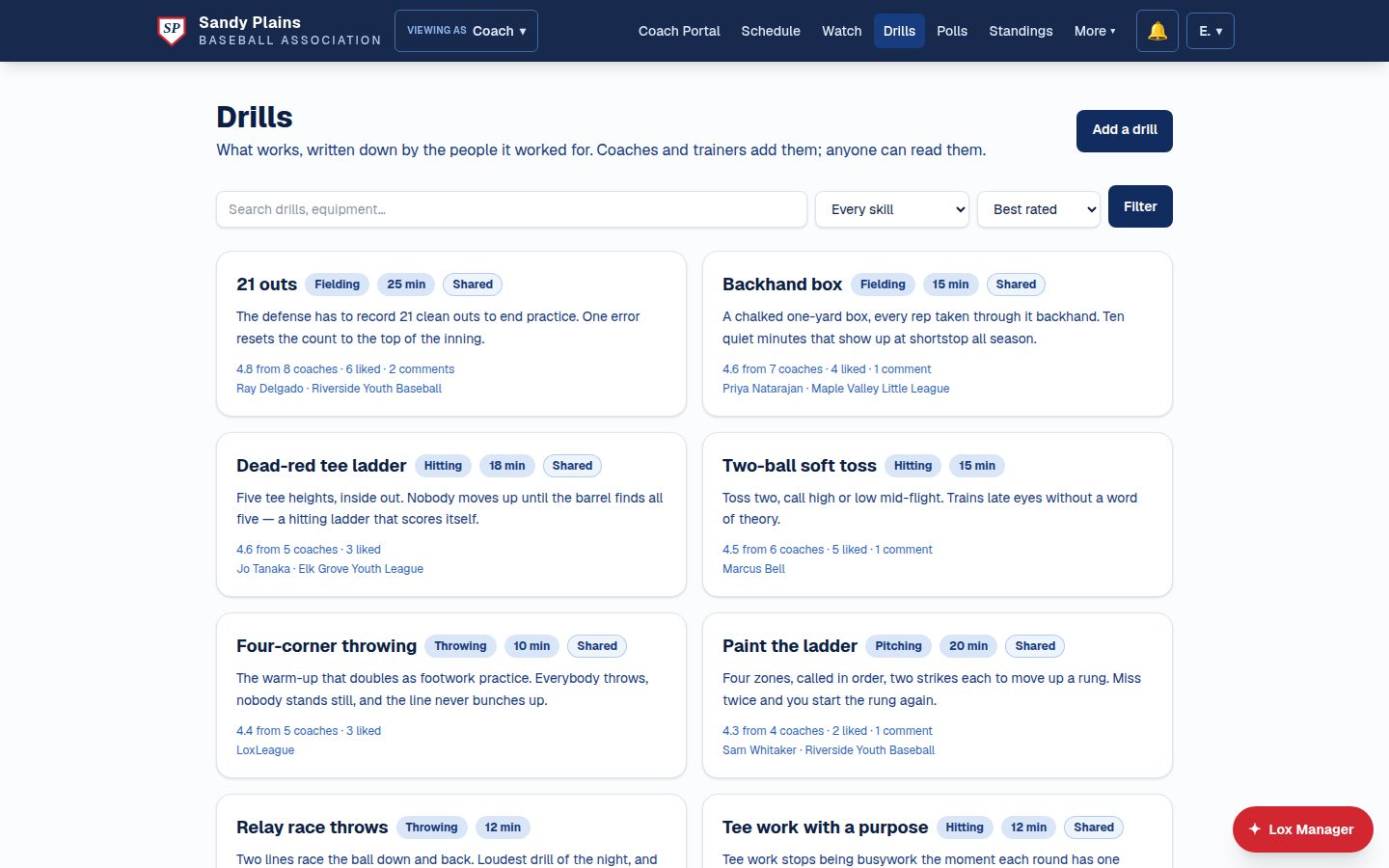
Everyone rates a drill out of five, likes it, and says what happened when they tried it — and "two balls was too much for our 8u" is worth more to the next coach than any star rating. Best-rated drills rise to the top of the shelf.
And it doesn't stop at your fence line
LoxLeague hosts a shared library between leagues. Your coaches' drills stay yours by default — mark one for every league and it travels, with your coach's name and your league's name stamped on it, to shelves in leagues that have never heard of yours. Drills that arrive from elsewhere carry a Shared badge, can't be edited under someone else's name, and anyone can flag one — flags come to LoxLeague, and it takes two leagues' flags to take a drill down pending review.
It works, not just reads
The practice planner drafts sessions out of your league's real drills — AI does the assembling, the coach does the deciding — so every block on the plan opens into something a coach can run the same way twice. Coaches and trainers recommend a drill to a family and it lands as a list to tick off at home. A new league starts with a hundred and seventy-four drills already on the shelf — tee-ball through 14U, weighted toward fielding and hitting — and a drill withdrawn by the board stays readable in any plan that already used it, because a plan printed Thursday has to make sense on Friday.
🤖 Coaching & AI tools
Practice & game planners, with AI support
The practice planner drafts a session from your roster ratings and flagged players; the game planner proposes a batting order and an inning-by-inning position chart. Both are then genuinely editable — move a child to short for the third, sit a sore arm, renumber the order, reorder a practice block. The fair-play checks re-run as you go and warn rather than refuse, naming what the change broke: "Rivera is at short for a third inning running." A practice runs a live total against the slot you actually booked, so a two-hour plan in a ninety-minute booking says so on Wednesday, not at the field. The parent-facing version regenerates from the coach's edits, so coach and family never hold two different practices.
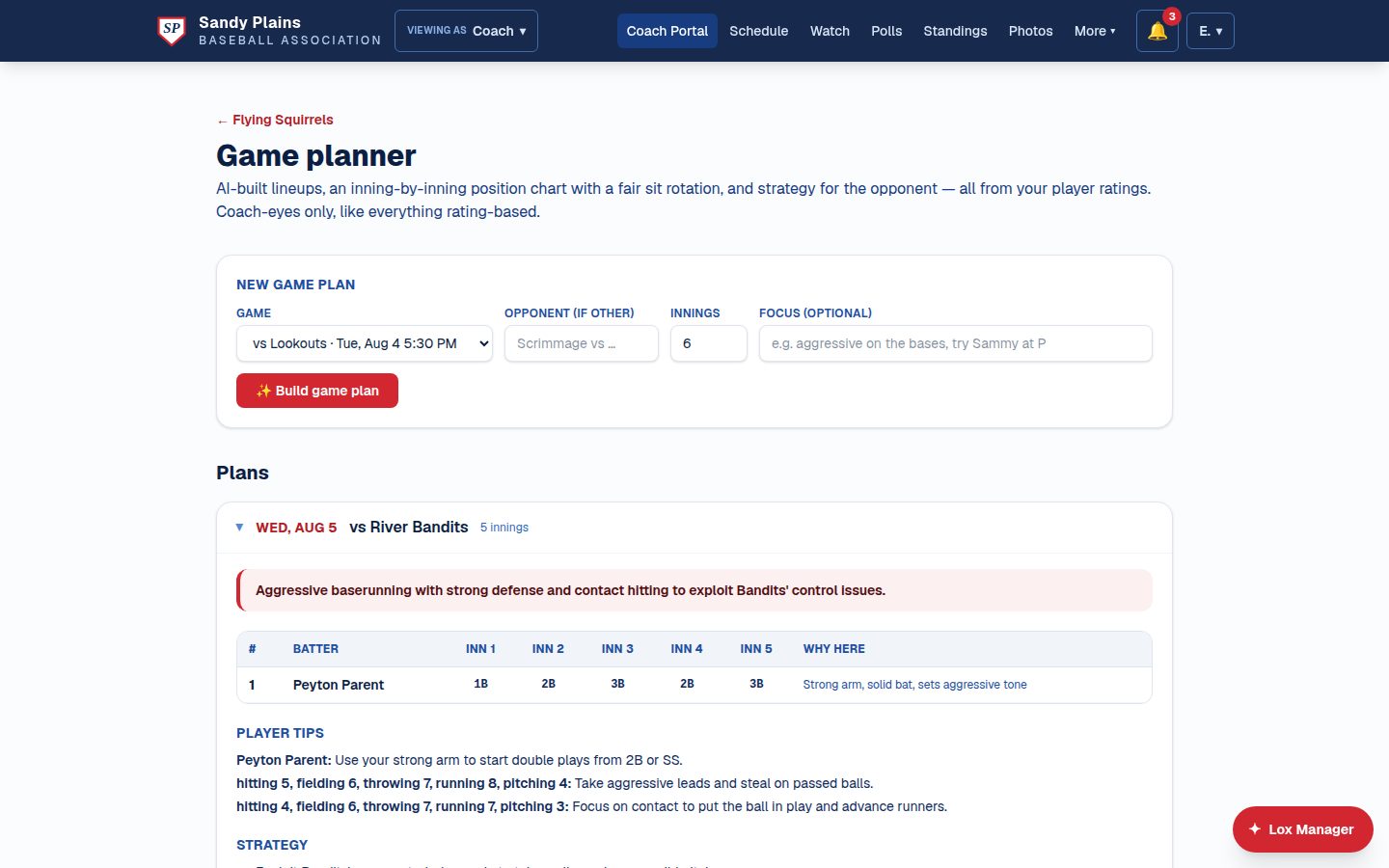
Communication that actually lands
League announcements, targeted registration reminders, coach-to-team messages, automatic game-change and waitlist notices — text to the opted-in, email to everyone else, with a delivery summary of who got what.
🎬 Film room & performance profiles
Upload clips, tag players, add notes; share with the team or keep coach-only. Step the clip one frame at a time, drag a jog wheel to scrub it, or watch at quarter speed — which is where mechanics actually become legible — and a note pins to the exact frame you stopped on. Film and notes follow the player season to season, visible to the family, the current coach, and any trainer the parent explicitly shares with.
Roster import & player notes
Bring a roster in from any CSV or spreadsheet — AI reads the columns, whatever shape they're in. Rate players 1–10 across five categories with private notes parents never see; the ratings feed the practice and game planners.
The lineup, drawn on a diamond
One picture per inning, each child's name standing where they'll actually be, the bench listed beside it. A tenth player with no spot on the chart is listed as a rover rather than quietly dropped. Press print from a phone in the car park and you get the plan and the diamonds — not the website — two to a row, every plan on the page whether or not you expanded it, and a Draft or Final badge printed on the paper. It works with no signal, because it prints the page you're already looking at.
Playing time, counted rather than remembered
Every inning in the field goes on the record after the game, and the season total sits beside each name — sorted with the fewest innings first, so the child who keeps sitting is visible long before the end-of-season banquet. Recording it is shared work: anyone on the team can enter innings, a parent can enter their own child's at-bats, and the fielding grid belongs to the coaches and the league office.
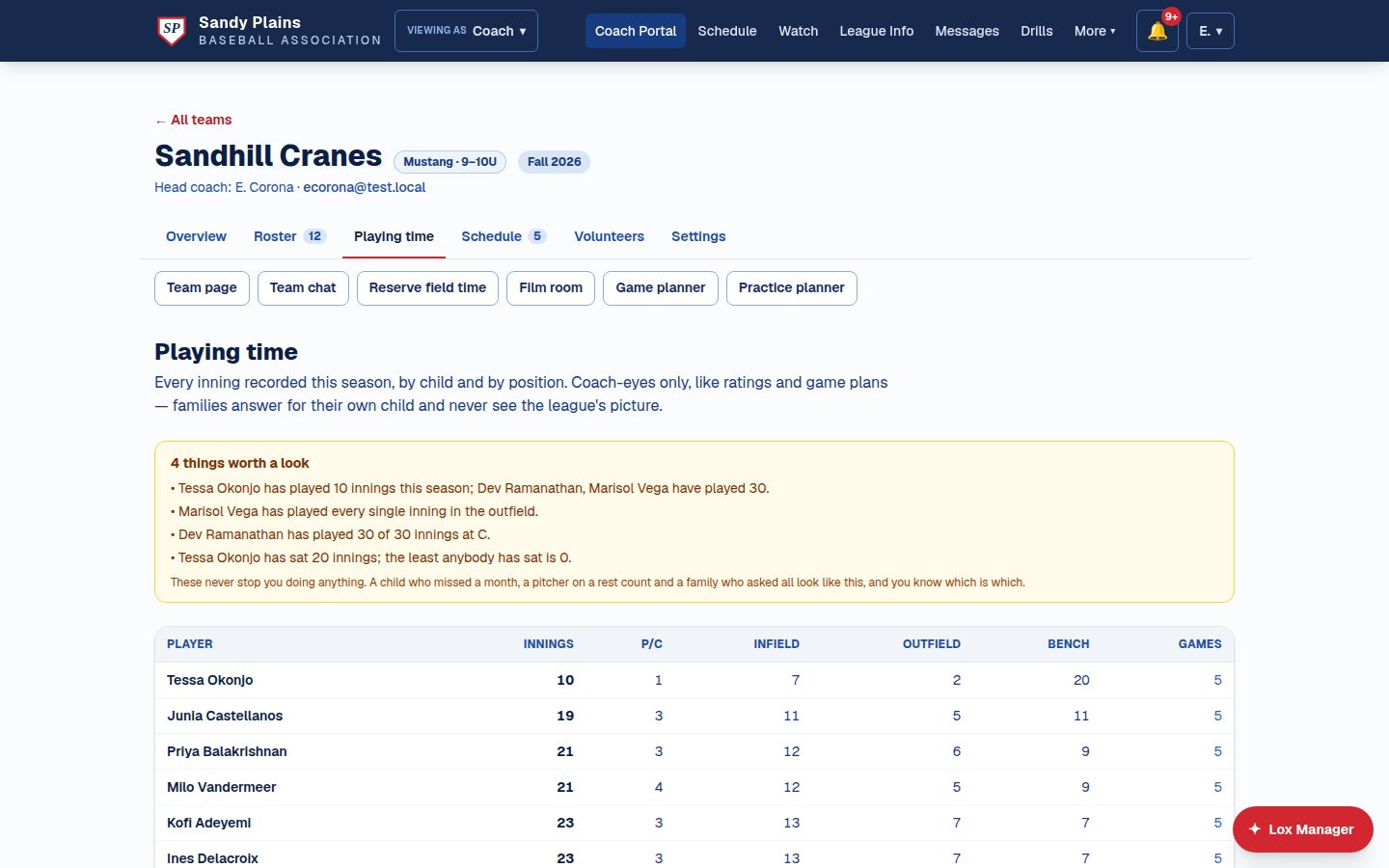
Ratings that remember
Rate a player as often as you like and every reading is kept, dated and attributed, instead of painting over the last one. You get the current value per category, the movement since the first reading, a chart, the full dated history, and a CSV — plus a choice about whether a trainer's readings count in the picture. Ranking, league-wide and per division, computes itself from the ratings coaches already enter, and an unrated player shows as unrated rather than last.
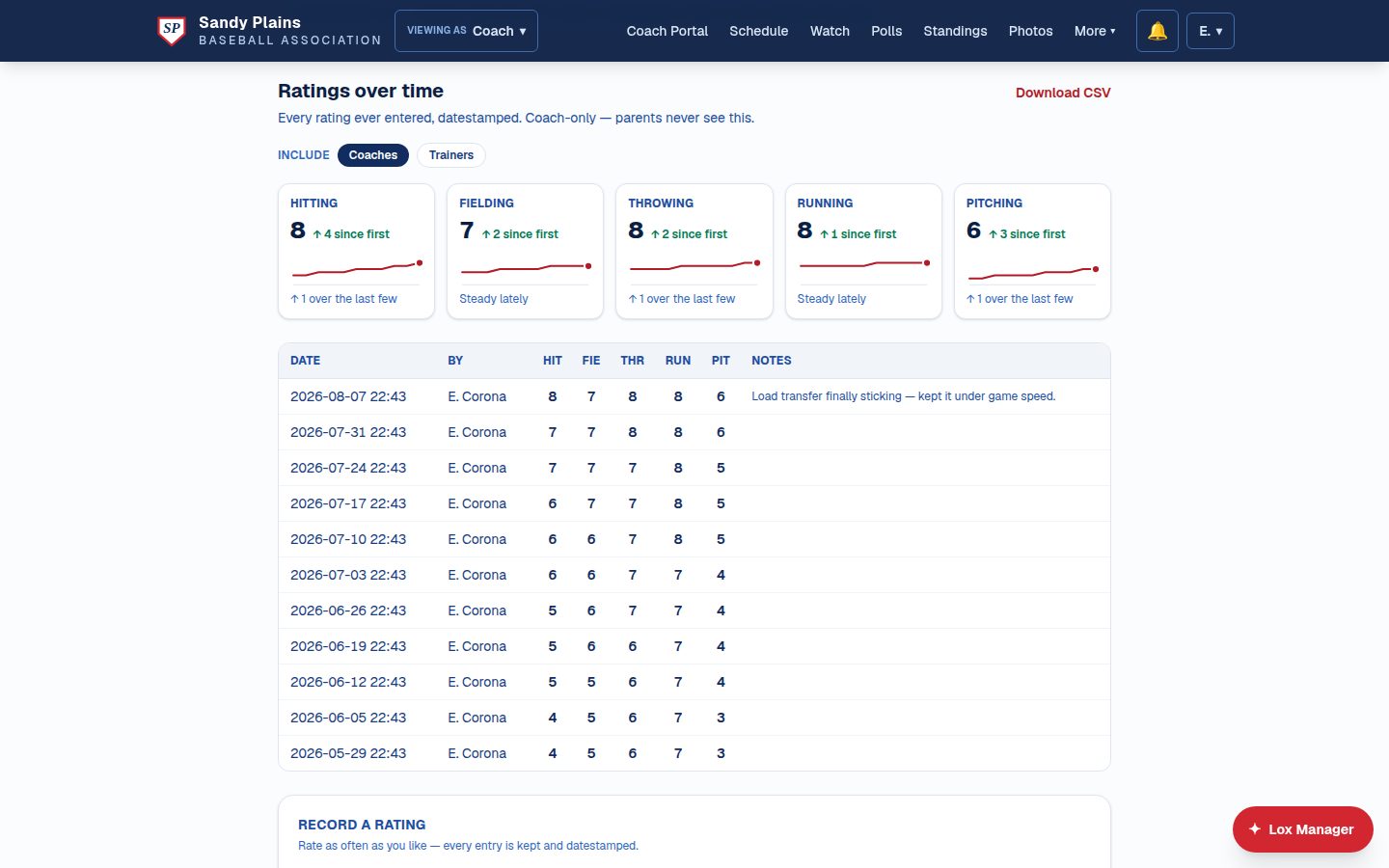
Notes that answer back
A coaching note pinned to a frame of film used to be one-way — the trainer, the other coach, and the parent all answered in a text thread the film never saw. Replies now hang under the note itself, so the conversation stays attached to the moment it's about. Who can join isn't a second sharing rule: whoever can see the clip can talk about it, so nobody can ever answer a note on film they weren't shown.
🏠 Community, safety & your brand
Photos, polls & the small stuff
Members-only team galleries (never public) with albums per game or tournament, comments, downloads, and a lightbox. Polls to any audience — coaches, parents, umpires, everyone. A lost & found board families can post to by text. Three discussion spaces with the right audiences: board room, coaches' lounge, team chat.
🛡️ Compliance & safety
Background screening and SafeSport/concussion training tracked per staff member with expiry warnings. Team photos auth-gated per team. Roster pages show names only — no contact or medical info. Every registration carries media consent you can filter on. A parent adds their own child's picture from their phone so faces match names at the first practice, and the image is re-encoded on the way in, which strips the location data phone photos quietly carry.
Accounts that are actually verified
Signing up sends a six-digit code, and until it's entered the account can look but not touch — no registering a player, no messaging a coach, no volunteering. Codes are stored hashed, expire, burn after five wrong guesses, and are rate-limited; phone numbers go through the same check before they'll ever receive a text. Whether the gate is enforced at all is a setting your league owns.
Direct messages a board can defend optional
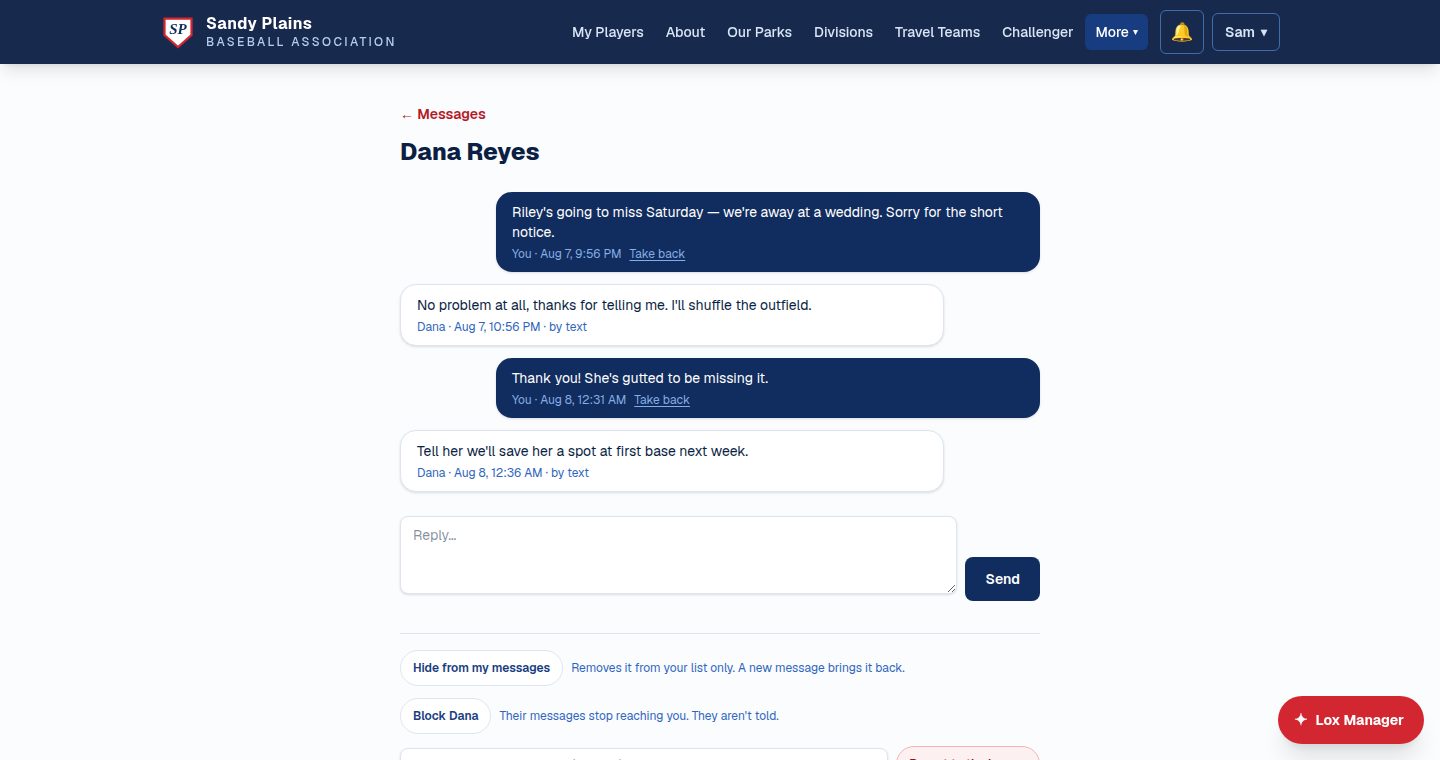
One conversation per person, on the site or by text. Who may start one follows a shared context — a team, a training booking, a job you're both down for — and umpires are reachable only by the league office and each other, so nobody takes a call up with the official who made it. The league always sees who is talking to whom, but can read a thread only if somebody reports it, and both parties are told when they do, because a parent needs a private way to raise a concern about a coach. Per-day limits, a block nobody can apply to the league office, and a record that survives a participant deleting their own message.
Your brand, your domain
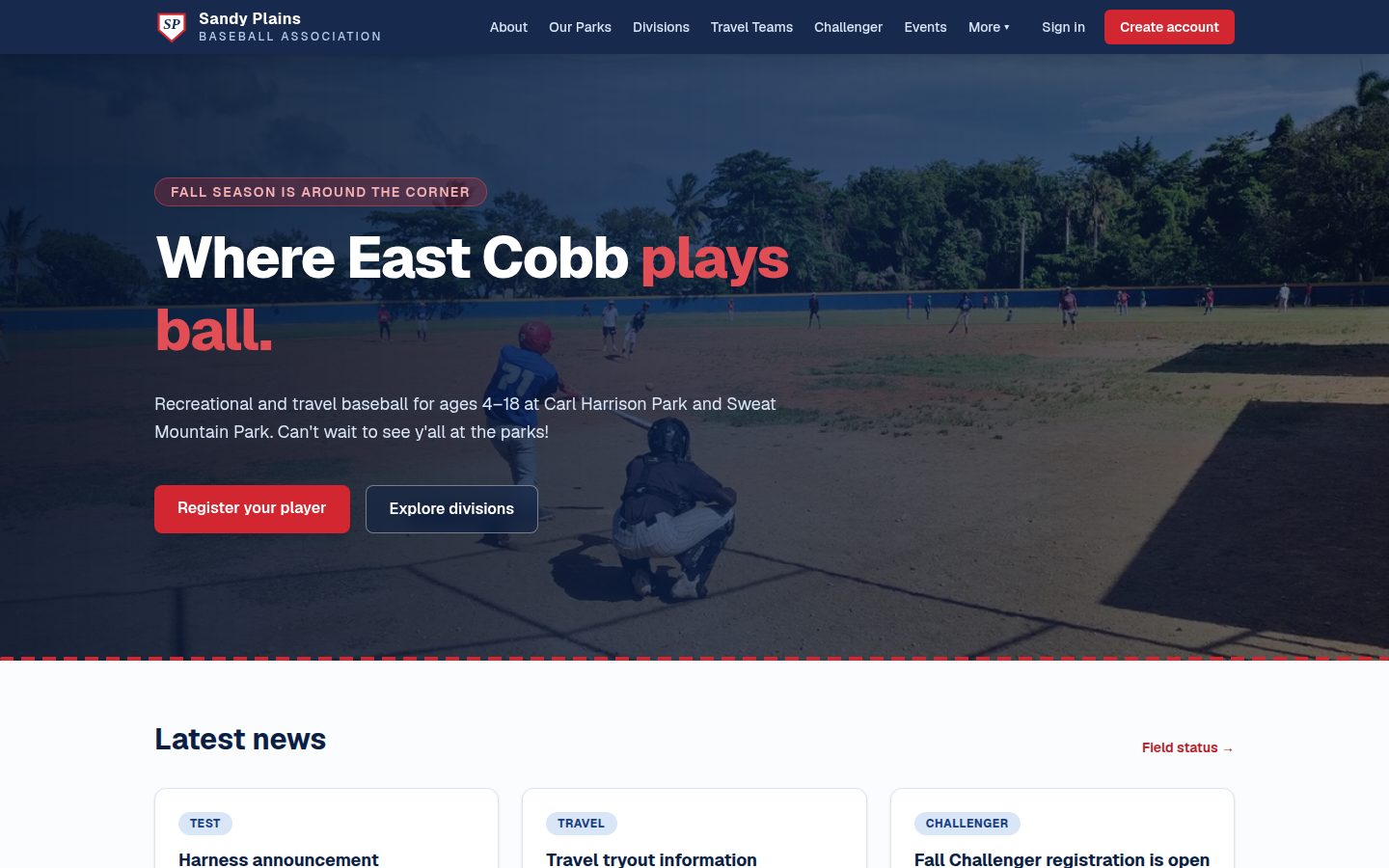
Your league's name, colors, content, and domain — with four visitor-selectable themes and a full CMS behind every public page. The homepage hero is your footage, too: video, a photo, or plain league colors. Hand the platform a phone video of opening day — up to 300 MB — and it cuts the quiet eight-second loop itself, showing you the result at desktop and phone width before anything publishes. Works at the ballpark: built mobile-first and audited at phone width, fast on two bars of signal, and every page renders — and every form posts — with JavaScript switched off entirely.
Works today, app on the way
No download needed: every page is built for a phone first, with touch targets sized to the standard and nothing that needs pinching. For everything urgent, families just get a text. A native app is in development for push notifications, offline scoring, and one-tap watching.
Built for every seat in the league
One login, eight experiences — each role sees exactly their job and nothing else, and the president who is also a coach and a parent switches hats without switching accounts. The navigation holds still while they do: one league bar that's identical for everyone, visitors included, and a workspace bar per role that opens on an Overview of the week and what needs you — so switching from coach to parent never moves the Schedule.
Parents
- One family account; each child placed in the right division by birthdate, automatically
- One-click season registration with automatic waitlists — no charge until a spot is real
- Dashboard that leads with the next game
- Team page: schedule, roster, coach notes, chat, members-only photo gallery
- Text alerts with real opt-in and one-word opt-out
- Say who's coming, per child, for every game and practice
- One calendar with every child's games, practices and league events
- Put your hand up for a job — on the site or by replying to the text
- Invite a second parent to the same account, and name an emergency contact
- Watch live broadcasts and replays
Coaches
- Team hub that opens on what's next and what needs you
- Roster import from any CSV or spreadsheet — AI reads the columns
- Practices with weekly repeat, checked against field availability
- Editable practice and game plans, with the lineup drawn per inning
- A headcount for Saturday — and the list of families who haven't answered
- Ask the team for a scorekeeper in one press; short jobs re-ask by text
- Score reporting; standings update the moment it posts
- Player ratings kept over time, with private notes parents never see
- Assistant coaches you grant capabilities to, one at a time
- Message every parent at once — text + email
League admins
- Full CMS: every public page, news post, and event edited in the browser
- Seasons, levels, and divisions with fees, capacity, and cutoff dates
- League Players: every registration filterable, sortable, with bulk actions
- Game scheduling with division guardrails
- League events that hold a field, with their own volunteer jobs
- Tryouts, the draft room, all-star selection, tournaments
- Playing rules published with versions, and coaches' questions answered
- Invite coaches by email; edit or suspend an account, with an audit line
- Audit log on everything
Field managers
- Open / closed / caution status per field, live on the public site
- Close a field or a whole park in one press — only the people with something booked there that day are told
- Zone-aware bookings — infield and outfield are separate
- A photo or park map of each resource, with the zones outlined on it
- Field-owner rolodex: parks staff and groundskeeper contacts per field
Umpires optional
- Registration and league approval
- Per-division crew sizes; open-game signup
- Scrimmage requests the league approves
- Payout ledger: umpire confirms the game, admin records amount, method, attribution
Trainers optional
- League-approved profiles with availability and slot booking
- Families book a session from the trainer's own calendar
- Parents choose what performance data a trainer sees — and the coach chooses whether a trainer's ratings count
Followers
- A grandparent or family friend invited to follow one player
- That child's games, photos and broadcasts — and nothing else
- Invited by the parent, revocable by the parent, at any time
Platform admin LoxLeague staff
- Our own operator role, for when you'd rather we just fixed it
- Every staff action badged as ours and visible to your league
- Nothing silent: it lands in the same audit log as a volunteer's click
📱 The LoxLeague app Coming soon
The site is already built for a phone first, and texts do the heavy lifting — but a native app is in development for the things only an app can do. Here's where it's headed.
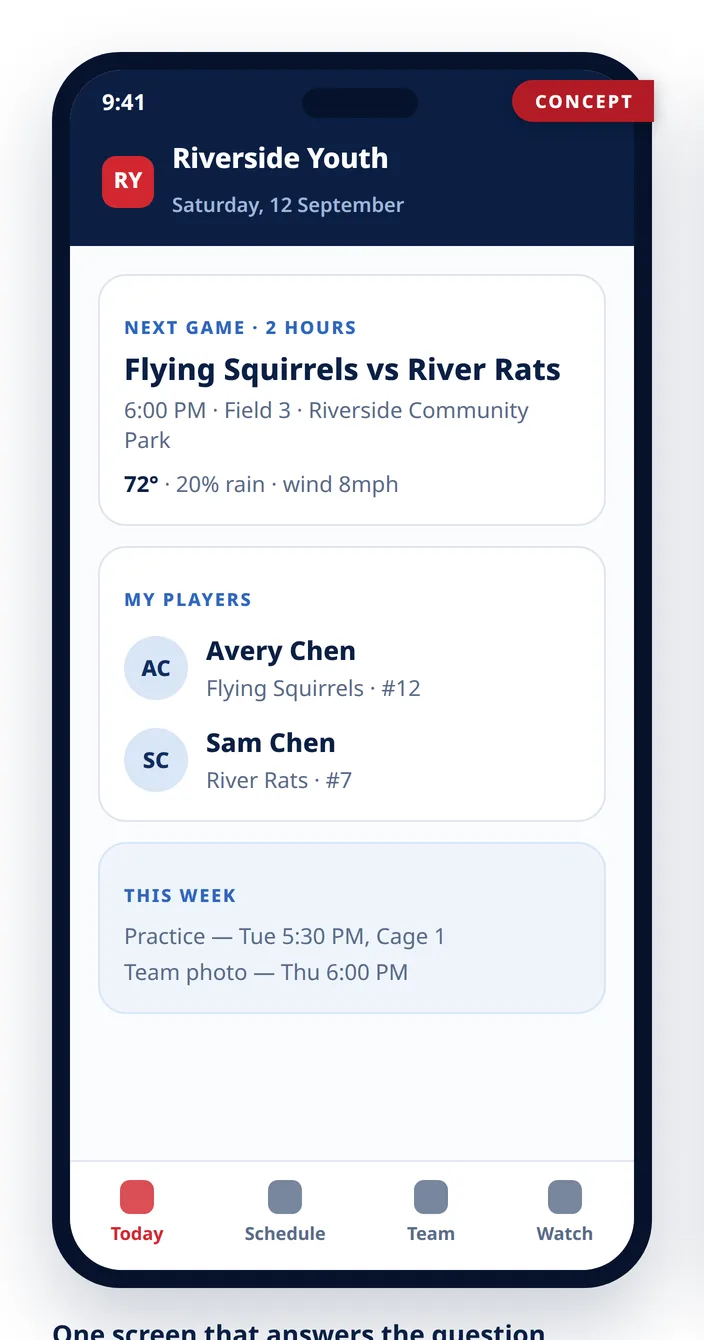
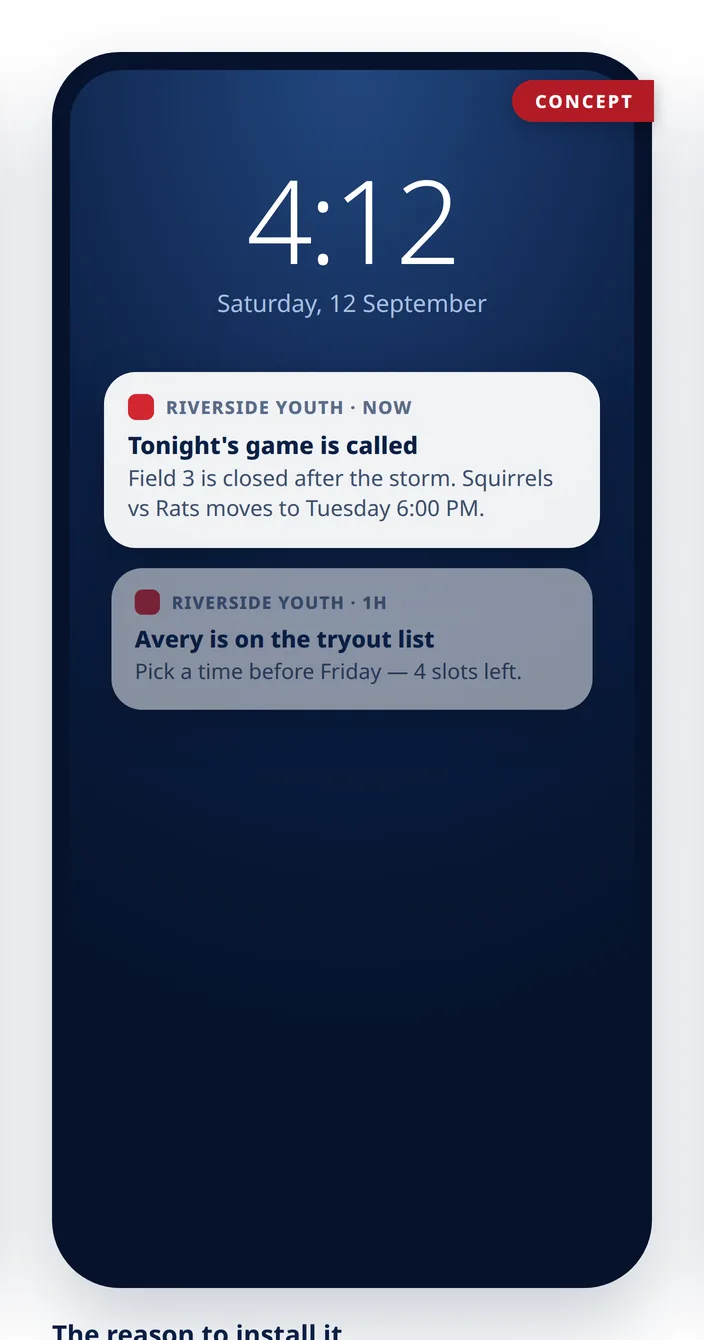
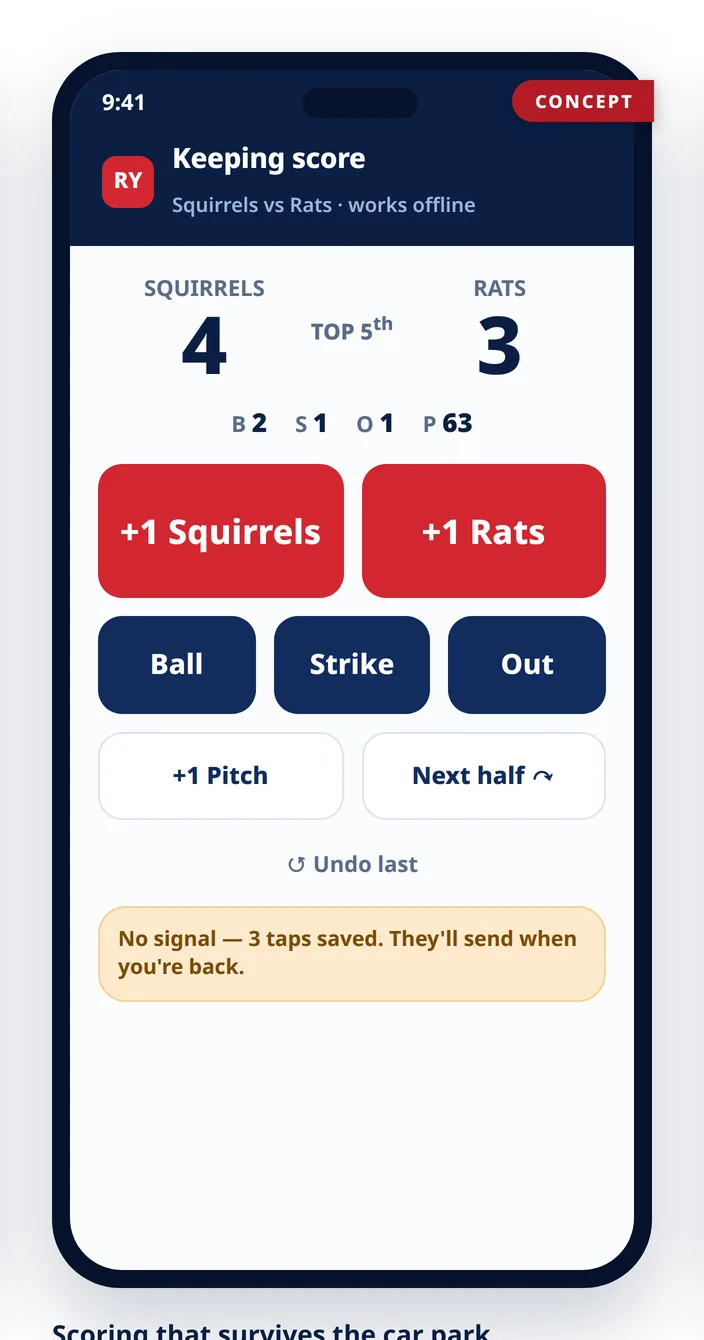
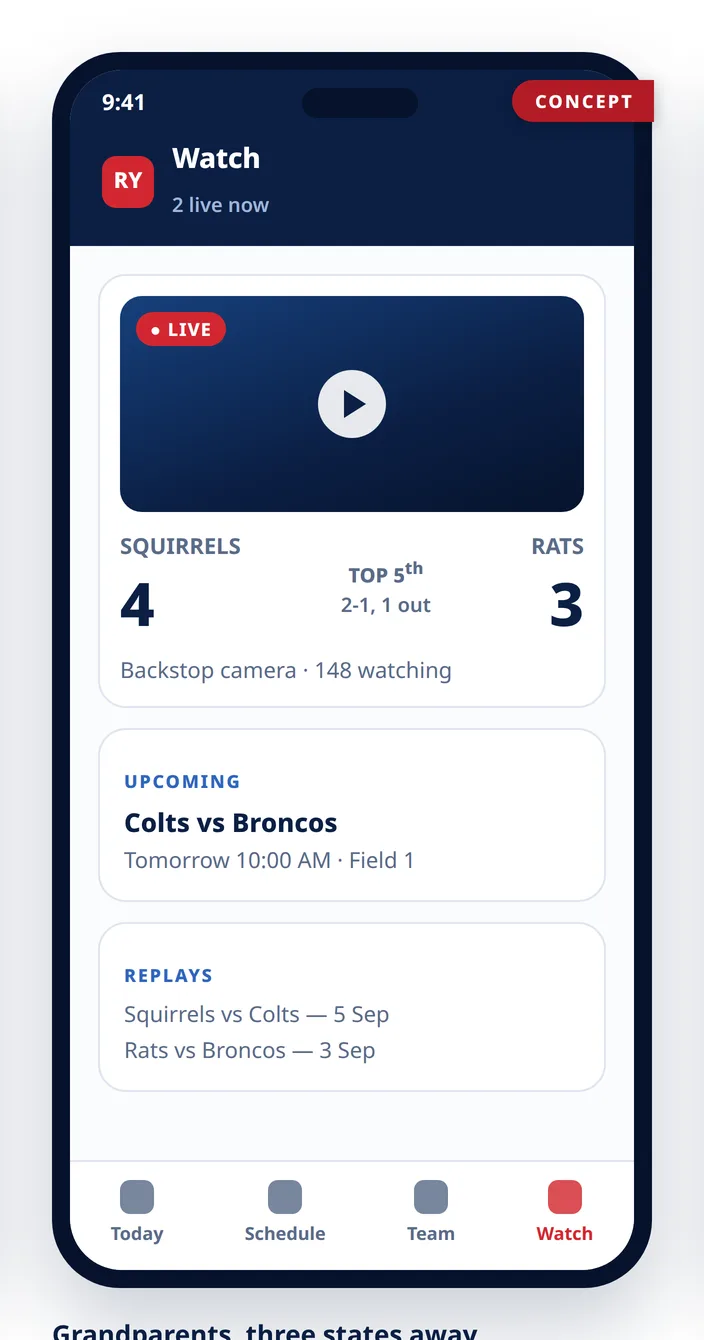
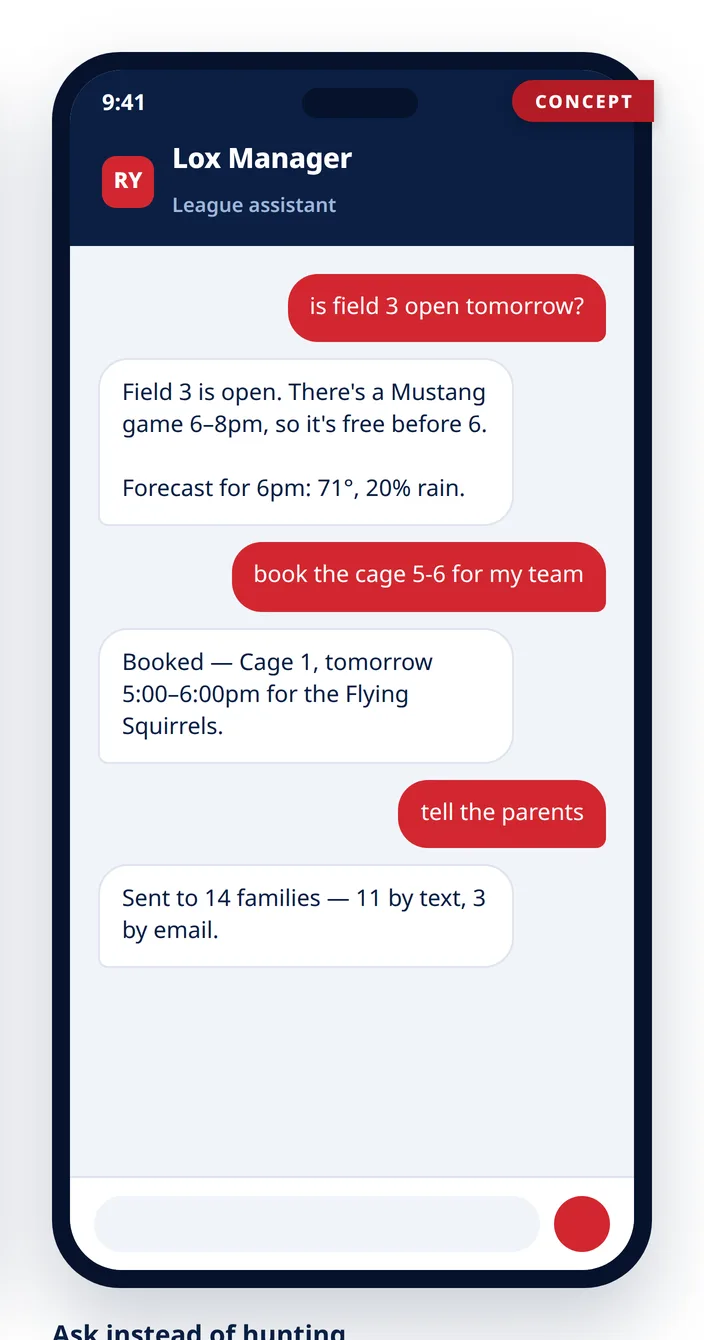
Concept previews — the design will evolve before release. Until then, the site itself is built for a phone first, and everything urgent reaches families by text anyway. Ask on a demo call to be first in line when it ships.
The full index
The four-page feature index from our overview document, condensed. If it's listed, it's built — ask us to show you any line on a call.
Public site
- Hero from your own footage
- CMS behind every page
- News, events, standings
- Live field status
- Four visitor themes
- Division explorer
Accounts & families
- Family accounts, password reset
- Six-digit account verification
- Two guardians per child
- Emergency contact
- Age-based division placement
- Followers (per-player guests)
Registration
- Capacity + auto-waitlist
- Promotion payment windows
- Versioned participation waiver
- Bulk actions & reminders
- Media-consent tracking
Tryouts & draft
- Sessions families book
- Concurrent evaluators
- Weighted composites
- Snake / round-slot drafts
- Pick clock, auto-draft, undo
- PDF draft summary
Coaching
- Roster import (AI-read)
- Practices w/ availability check
- Editable practice & game plans
- Fielding chart per inning
- Playing time, counted
- Ratings & private notes
- Open scrimmages
Player development
- Ratings over time, dated
- Trend chart + CSV export
- Computed league & division rank
- Film room, notes on the frame
- Profiles that follow the player
Drill library
- Setup, method, coaching points
- Ratings, likes & comments
- Feeds the practice planner
- "Try this at home" for families
- Cross-league shelf, opt-in
Scheduling
- Division guardrails
- Zone-aware field/cage booking
- One day view, grouped by park
- Home-park designation
- One occupancy layer
- League events hold a field
- Dated + seasoned booking windows
- Typed override, with undo
Volunteers & attendance
- RSVP per child, per event
- Headcount + who hasn't answered
- League catalog of jobs
- League-wide jobs, no team
- Take a job by SMS reply
- One calendar per person
Game day
- Live game broadcasts
- Live scoreboard overlay
- Phone scorekeeping
- Auto-updating standings
Tournaments
- Single or double elimination
- Gold / Silver / Bronze tiers
- Seeded, or set by hand
- Byes you choose
- Series + third-place game
- Public bracket, no login
Weather
- Hourly inside two days
- Weekly outlook
- Severe-weather warnings
- On games, practices, bookings
Umpires
- Registration & approval
- Crew sizes per division
- Game signup
- Payout ledger
Playing rules
- Draft, then publish with a note
- Every version kept & diffed
- Public page, no login
- Questions against a section
- Lox Manager quotes them
Communications
- Email + SMS blasts
- Delivery summaries
- Automatic event notices
- Targeted closure alerts
Direct messages
- Site or SMS, one thread each
- Started only in shared context
- Reportable, with both told
- Blocking & per-day limits
Community
- Board room (admins)
- Coaches' lounge
- Team chat
- Lost & found (post by text)
- Polls to any audience
Safety & privacy
- Ratings never shown to parents
- Auth-gated photos & video
- Player photos EXIF-stripped
- Background & SafeSport tracking
- Six-level player visibility
League office
- Edit an account, with audit
- Suspend for a stated period
- Coach invites, scoped by season
- Assistant-coach capabilities
- Audit log on everything
Platform
- Lox Manager AI (site + SMS)
- League info vault — role-scoped
- Support desk & notifications
- Own instance, own database
- White-label option
- Hosting, TLS, support included
Twenty minutes. Every question answered.
We'll walk your board through all of it live — registration filling a division, draft night, game day, and Lox Manager answering a parent mid-call.